Flexible GraphRAG v0.9.0 and KG Spaces v0.9.0 released, with support for Hyland OpenArch

Flexible GraphRAG on GitHub

X.com Steve Reiner @stevereiner  LinkedIn Steve Reiner LinkedIn Posts

Repost of my LinkedIn post from October 27, 2026 (original LinkedIn post)
Flexible GraphRAG v0.9.0 and KG Spaces v0.9.0 are released, with support for Hyland OpenArch.

Hyland OpenArch federates unstructured, AI-ready data from all sources across an organization and makes it available to AI services and agents while always respecting permissions. GitHub: https://github.com/Hyland/OpenArch

In OpenArch mode, OpenArch is the search, vector, and document state store. Flexible GraphRAG sends it parsed text from its doc processors (Docling, LlamaParse, LiteParse) plus embedding chunks, and keeps building knowledge graphs into any of 15 property graph databases and/or 4 RDF stores. Search and AI query fuse graph and RDF results with OpenArch search and vector results.

All 14 data sources work with OpenArch, 10 with incremental auto-sync:
Auto-sync: Alfresco, Nuxeo, SharePoint, OneDrive, Box, Google Drive, Amazon S3, Google Cloud Storage, Azure Blob Storage, Filesystem
Without: CMIS, Web Pages, Wikipedia, YouTube

Builds on the 0.8.x permission work: per-source sign-in/sign-out, results filtered to what each user can see (UI and MCP), and filter pills to pick which sources feed hybrid search and AI chat. v0.9.0 adds separate Graph and RDF columns to the Processing table for per-file/folder options.

The projects

🔹 Flexible GraphRAG: Python backend, doc processing, KG building, ontologies, RAG/GraphRAG, Angular/React/Vue UIs, MCP server
GitHub: https://github.com/stevereiner/flexible-graphrag

🔹 python-openarch-api: Python client for OpenArch’s REST API
GitHub: https://github.com/stevereiner/python-openarch-api

🔹 KG Spaces for Alfresco ACA: “Add to KG Spaces” (ingest, or manage search+vector, graph, RDF, auto-sync) and “Ask KG Spaces about this folder or document”
GitHub: https://github.com/stevereiner/kg-spaces-aca

🔹 KG Spaces for Nuxeo (new): runs in its own tab; the Add/Ask menus in Nuxeo Web UI switch to it, and view links switch back
GitHub: https://github.com/stevereiner/kg-spaces-nuxeo

🔹 KG Spaces Deployment: one Docker Compose with Alfresco, Nuxeo, Hyland OpenArch, Flexible GraphRAG and both KG Spaces UIs; pick your graph DB and/or RDF store
GitHub: https://github.com/stevereiner/kg-spaces-deployment

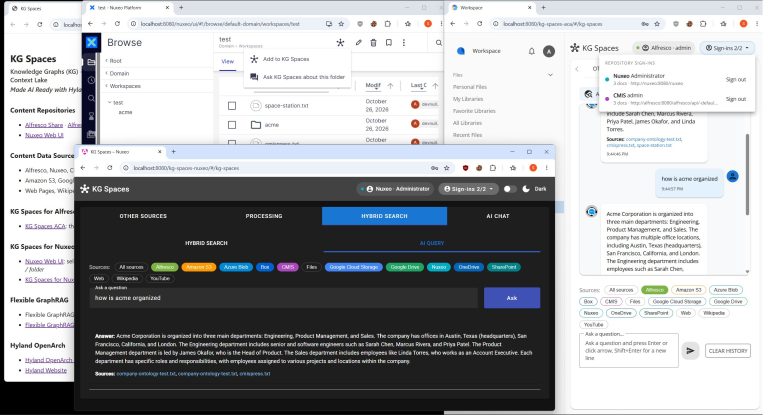
📸 The image: KG Spaces landing page, Nuxeo Web UI with Add to KG Spaces, KG Spaces for Nuxeo AI query, and KG Spaces for ACA AI chat, with search filter pills from ingesting all 14 sources.
Flexible GraphRAG v0.8.4 and KG Spaces v0.8.4 for the Alfresco Content App (ACA)

Flexible GraphRAG on GitHub

X.com Steve Reiner @stevereiner  LinkedIn Steve Reiner LinkedIn Posts

Repost of my LinkedIn post from October 12, 2026 (original LinkedIn post)

Flexible GraphRAG v0.8.4 and KG Spaces (v0.8.4) for Alfresco Content App (ACA)

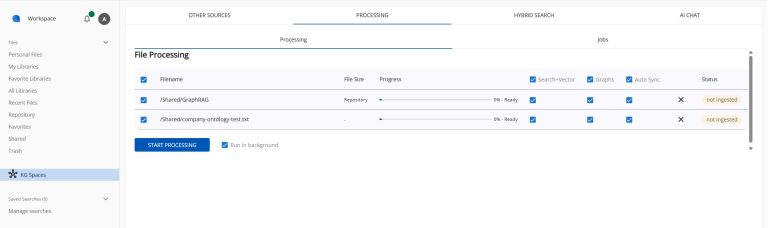
📸 KG Spaces Processing Tab Each row now has Search+Vector, Graphs and Auto Sync checkbox columns instead of single settings.
• You can use these when ingesting, and later to manage settings: turn vector + search indexing on or off, auto-built graphs (property and/or RDF) on or off, and auto sync on or off, per document, per folder, or for all.
• On documents or folders that are already processed, unchecking Search+Vector and/or Graphs removes them (checking adds them) when you click Start Processing.
• New Run in background checkbox
• New user Jobs tab: shows the users document ingests, index / graph adds and removals, and when an auto sync occurs.

🔗 Answers you can trace: Hybrid search results (vector, search, graph, and RDF) and AI query / AI chat answers now name the source documents they came from, as links:
• Alfresco documents open in the ACA viewer over their folder (or in Share)
• Nuxeo documents open in the Nuxeo Web UI
• Web pages and Wikipedia open at their URL
• YouTube opens at the time of the transcript segment

🤖 Source links from the MCP server too The Flexible GraphRAG MCP server returns the same style source links: Alfresco documents to view in ACA, Nuxeo in its Web UI, and links for web page, Wikipedia and YouTube sources. Use search_documents tool for hybrid search and query_documents tool for AI query.

🔐 Permission-aware answers: Hybrid search, AI query and AI chat return results only from documents the signed-in Alfresco user may read.

💬 New in KG Spaces
• Ask KG Spaces about this document / folder menu, then keep asking with this context in AI chat
• Closing ACAs viewer from source links returns you to your hybrid search results, AI query, or AI chat

Also: ArcadeDB moves to 26.10.1.

Flexible GraphRAG GitHub: https://github.com/stevereiner/flexible-graphrag
KG Spaces for ACA GitHub: https://github.com/stevereiner/kg-spaces-aca

Flexible GraphRAG v0.7.2 is out: Hyland Nuxeo data source, OAuth2 and ticket auth for Alfresco, OAuth2 for the MCP server

Flexible GraphRAG on GitHub

X.com Steve Reiner @stevereiner  LinkedIn Steve Reiner LinkedIn Posts

Repost of my LinkedIn post from August 10, 2026 (original LinkedIn post)

Flexible GraphRAG v0.7.2 is out 🚀
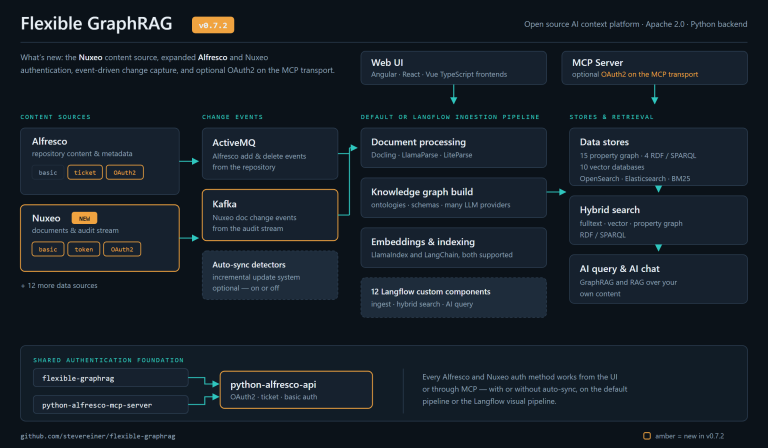
🆕 Hyland Nuxeo is now a supported data source, with OAuth2, token, and basic authentication.
🔐 Hyland Alfresco data source gains OAuth2 and ticket authentication in addition to basic authentication.
🔑 The Flexible GraphRAG MCP Server optionally supports OAuth2 on the MCP transport itself.

📡 ActiveMQ carries Alfresco add, delete, and modify events, and Kafka carries Nuxeo document change events off the audit stream.

Alfresco and Nuxeo authentication works from the UI or through MCP, with or without the auto-sync incremental update system enabled, and on either the default pipeline or the Langflow visual ingest pipeline.

The python-alfresco-mcp-server was also updated, adding OAuth2 and ticket auth plus optional MCP transport OAuth2. Both projects build on the updated python-alfresco-api, which provides the enhanced OAuth2, ticket, and basic authentication.

Flexible GraphRAG is an Apache 2.0 open source AI context platform: a document processing pipeline (Docling, LlamaParse, or LiteParse), knowledge graph auto-building, ontologies and schemas, many LLM providers, GraphRAG and RAG, hybrid semantic search (fulltext, vector, property graph, RDF/SPARQL), AI query, and AI chat.

The backend is Python, with both LlamaIndex and LangChain fully supported. Angular, React, and Vue TypeScript frontends and an MCP server are included.

The stack supports 14 data sources (10 with incremental auto-sync), 15 property graph databases, 4 RDF triple stores, 10 vector databases, and OpenSearch / Elasticsearch / BM25 search, plus Alfresco and Nuxeo. All databases and dashboards can be enabled with the provided Docker Compose layout.

Optionally, the ingest pipeline, hybrid search, and AI query can run through customizable Langflow visual flows (12 custom components).

flexible-graphrag github: https://github.com/stevereiner/flexible-graphrag

python-alfresco-mcp-server github: https://github.com/stevereiner/python-alfresco-mcp-server

python-alfresco-api github: https://github.com/stevereiner/python-alfresco-api

Flexible GraphRAG or RAG is flexing to the max: 8 Graph databases, 10 Vector databases, 3 search engines working (can docker compose all including dashboards), 13 data sources

Flexible GraphRAG on GitHub

X.com Steve Reiner @stevereiner  LinkedIn Steve Reiner LinkedIn Posts

Flexible GraphRAG or Flexible RAG, an Apache 2.0 open source python platform, is now flexing to the max using LlamaIndex, in terms of supporting more databases and data sources: supports 8 graph databases, 10 vector databases, 3 search engines, and 13 data sources,. Also supports knowledge graph auto-building, schemas, LlamaIndex LLMs, Docling doc processing (LlamaParse coming soon), GraphRAG mode, RAG only mode, Hybrid search, and AI query / chat. Has React, Vue, and Angular frontends, and a FastAPI backend. React, Vue, Angular, Backend now work on Windows, Mac, Linux (standalone or in docker). Also has a FastMCP MCP server. Has a convenient docker compose that can include any of the databases (Vector, Graph, Search, Alfresco) and Dashboards / Consoles.

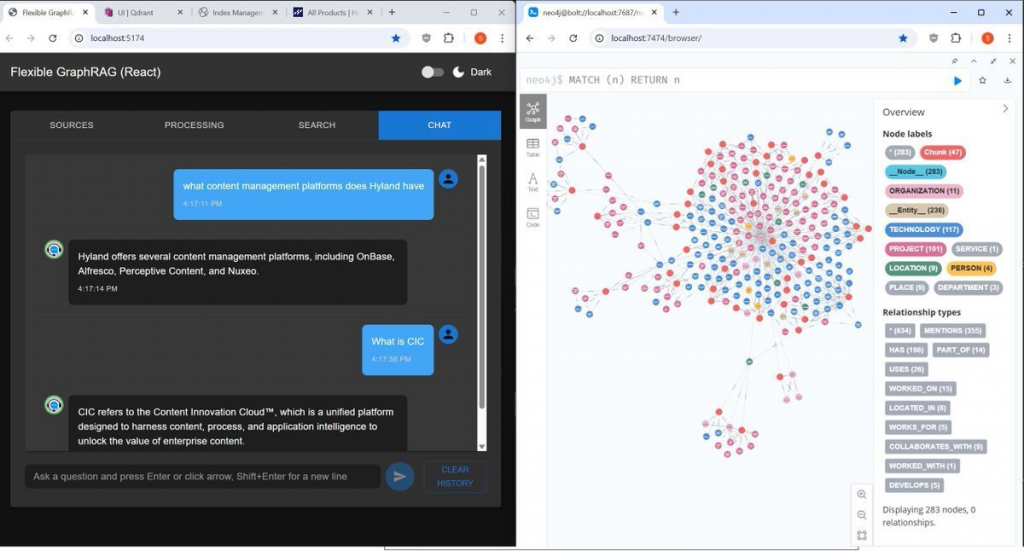
(Flexible GraphRAG AI chat shown with Hyland products web page(s) used with web pages data source to auto-generated a Neo4j graph).

Convenient docker compose: you can choose to include from all supported 10 vector and 8 graph databases, Elasticsearch, OpenSearch, and Hyland Alfresco Community. Include in the docker-compose.yaml by just removing the # comment in front of their includes. Dashboards / Consoles for these databases, as much as possible are also included in the docker compose choices (either in the yaml file for the database or for some a separate yaml file include).

You can run the docker with the databases with the backend and frontends (React, Angular, Vue) running stand alone in separate terminal windows. In addition to running the databases in docker, you can include the backend and frontends in the dock compose by including the app-stack.yaml and proxy.yaml includes. Now have no config duplication for standalone backend+frontends vs full docker mode: previously had to repeat all config in app-stack.yaml now use env_file: include standalone backend .env and overrides with include of docker.env (for configs that need host.docker.internal)

All 8 Graph database working: Neo4j, ArcadeDB, FalkorDB, archived Kuzu (LadybugDB fork todo), NebulaGraph, Memgraph, Amazon Neptune, Amazon Neptune Analytics

All 10 Vector databases working: Qdrant, Elasticsearch vector, OpenSearch vector, Neo4j vector, Milvus, Weaviate, Chroma (both http, embedded), Pinecone, PostgreSQL + pgvector, LanceDB

All 3 Search engines working: Elasticsearch, OpenSearch, LlamaIndex built-in BM25

New Data Sources: using LlamaIndex readers: 1. working ones that don’t use document processing: Web Pages, Wikipedia, Youtube, 2. working using document processing: S3, 3. ones using document processing still to test: Google Drive, Microsoft OneDrive, Azure Blob, GCS, Box, SharePoint.

Support for Docling document processing is currently available. Being able configure to use LlamaParse coming soon.

Original data sources with document processing that don’t use LlamaIndex readers: filesystem, Alfresco, CMIS. Hyland Alfresco Community can be included in the docker compose by taking the “#” comment off the beginning of its include.

LLMs: LlamaIndex LLMs (LlamaIndex has support for very many), Flexible GraphRAG currently has config for 1. tested, working: OpenAI, Ollama, 2. untested: Anthropic Claude, Google Gemini, Azure OpenAI.

Previous Flexible GraphRAG posts:

See Flexible GraphRAG Initial Version Blog Post

See New Tabbed UI for Flexible GraphRAG (and Flexible RAG)

See Flexible GraphRAG: Performance improvements, FalkorDB graph database support added

See Flexible GraphRAG: Supports ArcadeDB Graph Database with new LlamaIndex Integration

See Flexible GraphRAG: Amazon Neptune, Neptune Analytics, and Graph Explorer support added

New Tabbed UI for Flexible GraphRAG (and Flexible RAG)

See Flexible GraphRAG Initial Version Blog Post

Flexible GraphRAG on GitHub

X.com Steve Reiner @stevereiner LinkedIn Steve Reiner LinkedIn

The Angular, React, and Vue frontend clients now have different stages organized into different tabs so they have room. They all can be switched between a dark and light theme using the slider at the top right corner. New functionality beyond the old UI includes a file upload dialog, drag/drop upload, a table with file processing progress bars, and a new Chat UI. Note the github readme.md page has collapse / expand sections to look at screenshots with dark and light themes for React, and only shows the light theme for Angular and Vue.

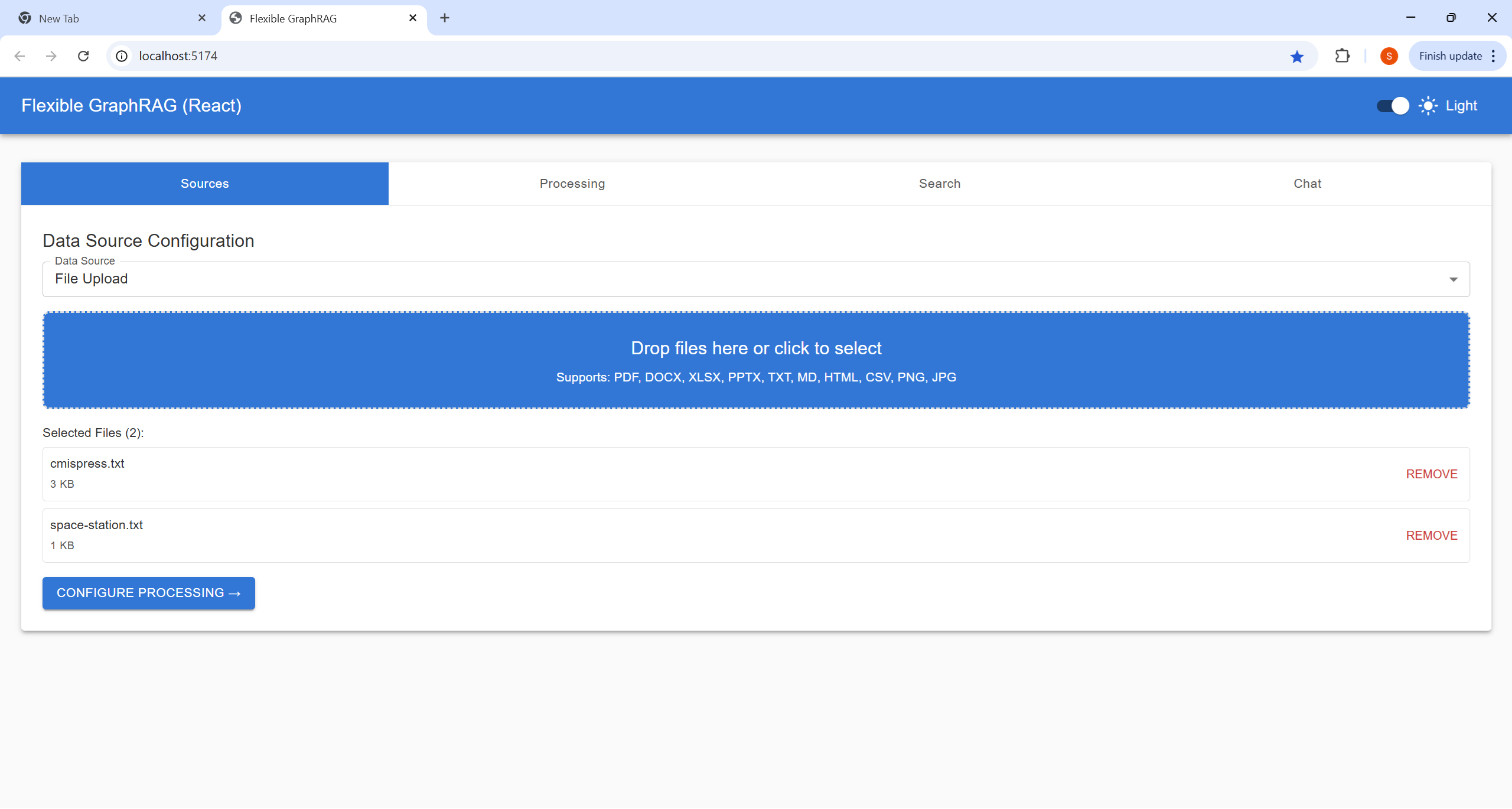
Sources Tab


Allows you to choose file to upload from the file system, or paths file or folder path in Alfresco or CMIS repositories. For filesystem files you can now use a file upload dialog and drag/drop files onto the drop area in the source tab view.

For Alfresco and CMIS their no file picker UI currently (only a field for folder or file path) Note the file path is a basic CMIS style path like /Shared/GraphRAG/cmispress.txt. You also specify username, password and base URL like prefilled http://localhost:8080/alfresco for Alfresco and http://localhost:8080/alfresco/api/-default-/public/cmis/versions/1.1/atom for CMIS.

You then click on “Configure Processing“


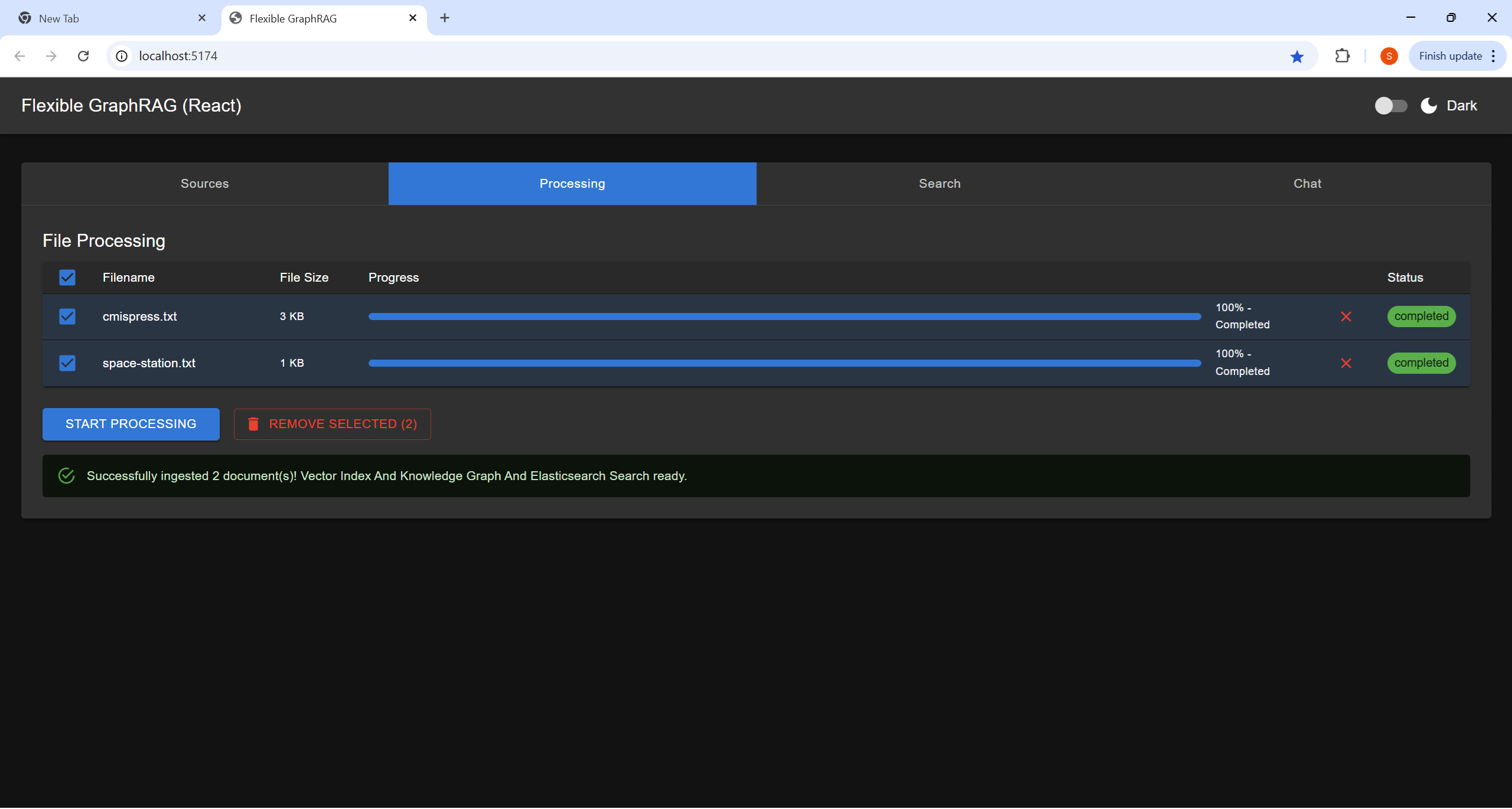
Processing Tab

Here you can modify what files get processed by unselecting / selecting file checkboxes, Remove from processing list by using x a on file row, our use the remove selected button.
The click on Start Processing to process selected files.
There is an overall progress bar, and per file progress bars. Note currently all files are processed as one batch in the backend, so the file progress bars will be showing the same status.
You can cancel processing by using the cancel button

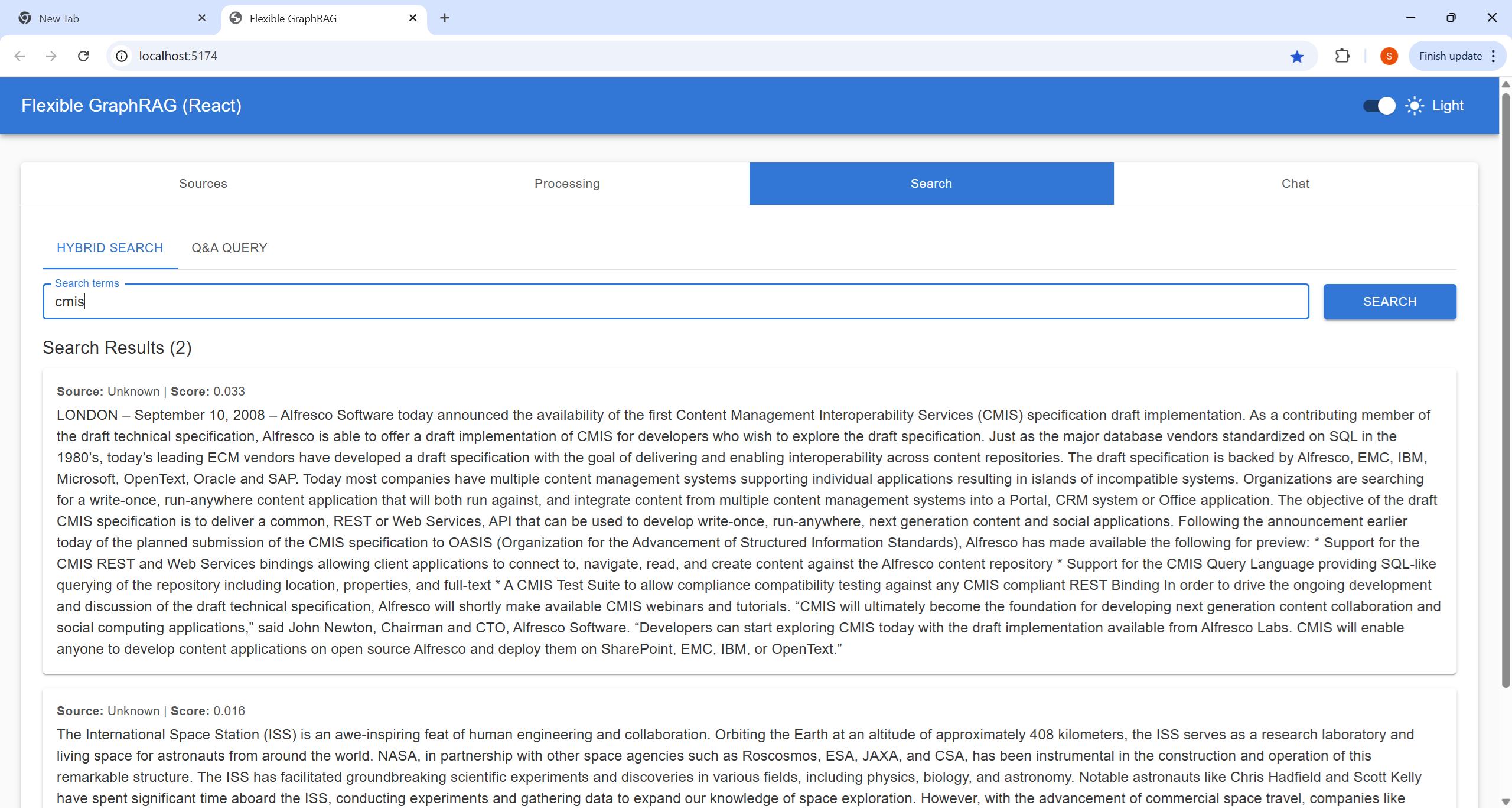
Search Tab

Here you can do a Hybrid Search (Fulltext+Vector RAG+GraphRAG) or (Fulltext+Vector RAG) depending on configuration. This gives you a traditional results list. For now ignore the scores and extra results just check results order.

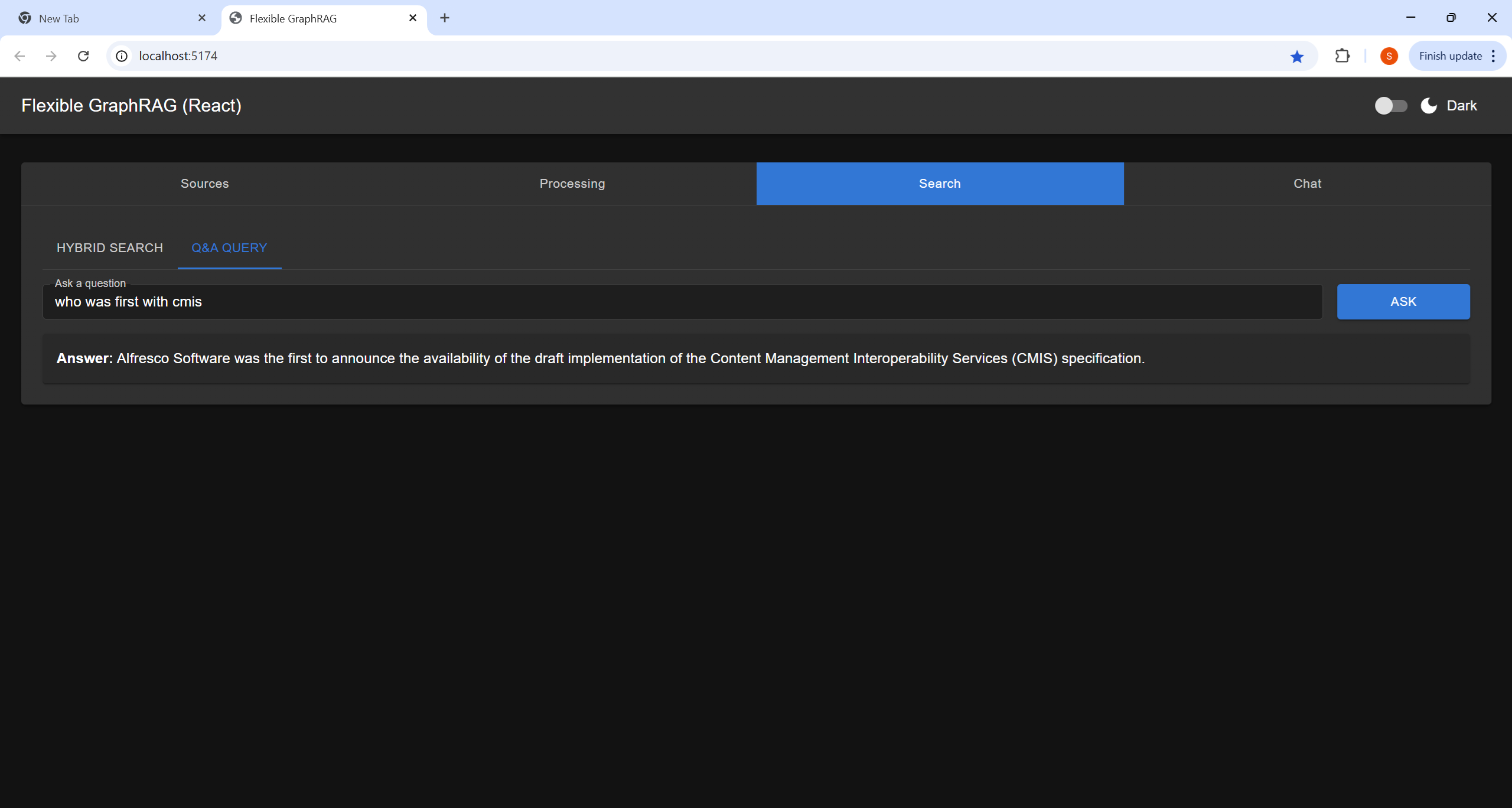
The Q&A Query, Here you ask a question using conversational style (This is an AI query using the configured LLM and the information submitted in the processing tab (and in full text, vector, and graph “memory”)

Chat Tab

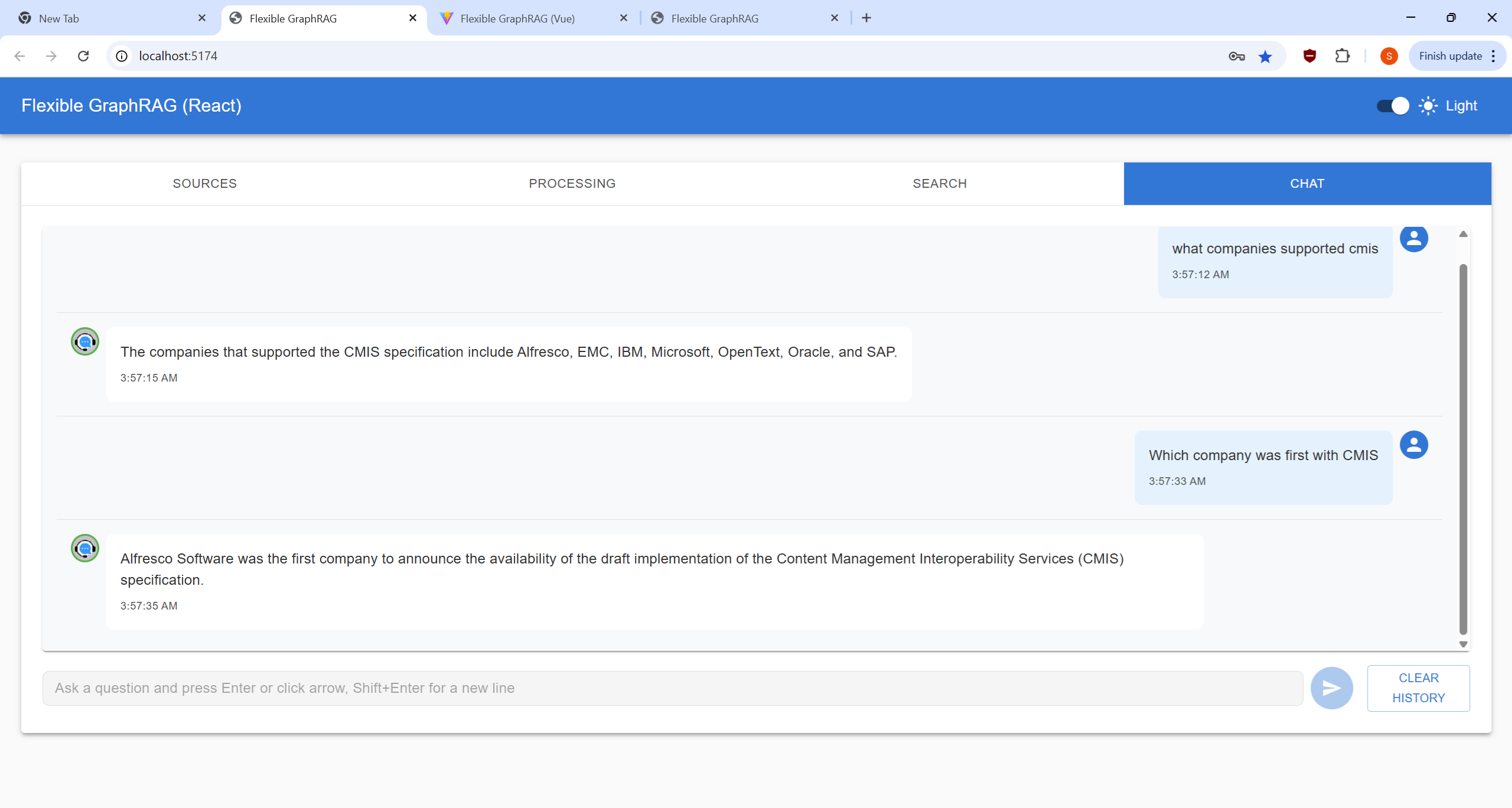
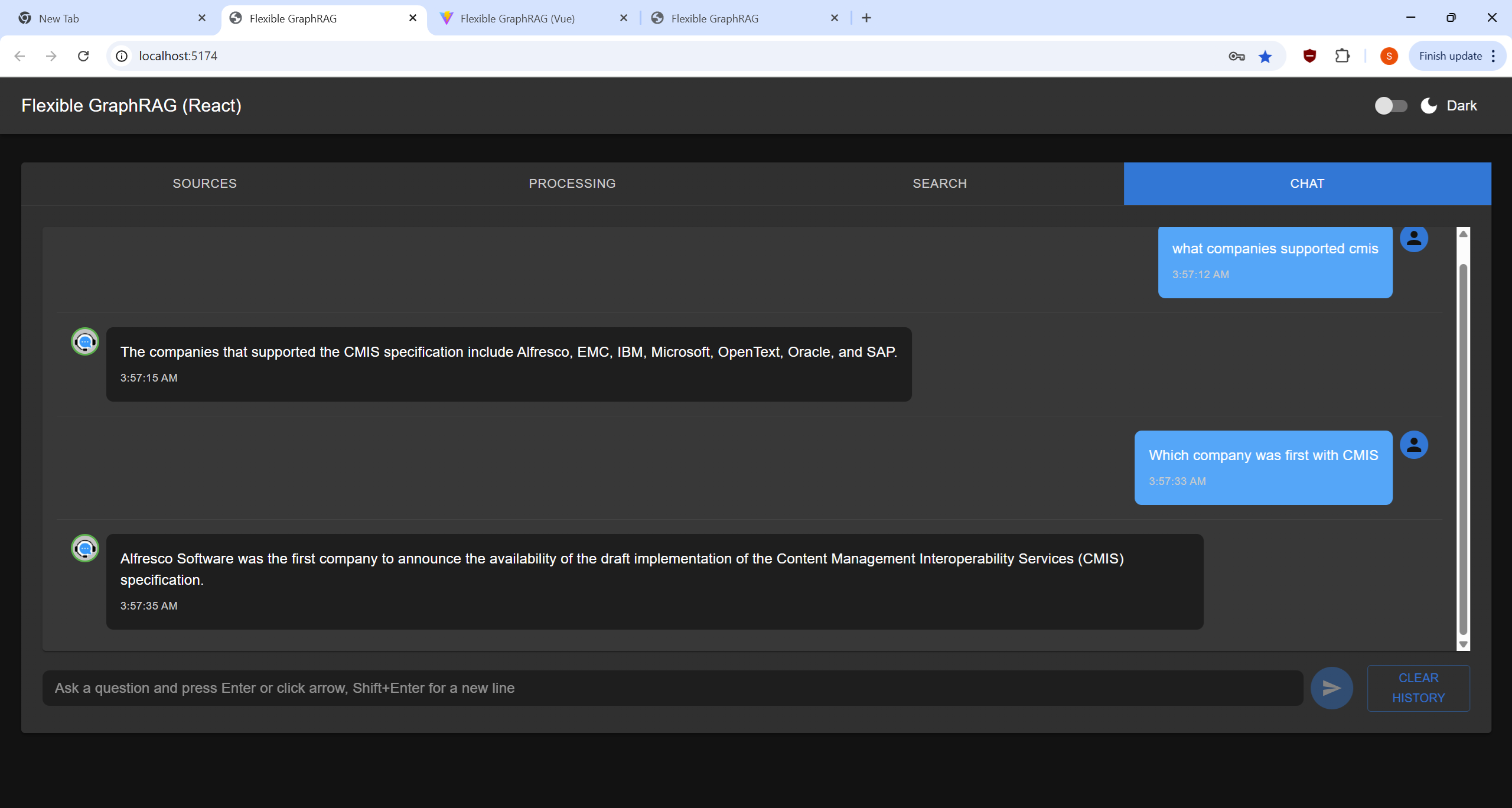
This a traditional chat style UI allowing you the enter multiple conversational Q&A queries (AI queries like the one at a time in the Search Tab). You hit enter or click the arrow button to submit a query. You can also use Shift+Enter to get a extra new line for your question. The chat view area displays a history of questions and answers. The you can clear things with the Clear History button

Flexible RAG

I used Flexible RAG in the title to indicate that Flexible GraphRAG can be configured to just be a RAG system. This would still have the flexibility that LlamaIndex abstractions provide to be able to plug in different search engines/databases, vector databases, and LLMs. You still get Angular, React, and Vue frontends, have MCP server support, a FastAPI backend, and Docker support. You could just configure a search engine. You could just configure a Graph database for auto graph building of knowledge graphs using the configurable schema support.

For RAG configuration:
Flexible GraphRAG can be setup to do RAG only without the GraphRAG (see env-sample.txt and setup your environment in .env, etc.):

  • Have SEARCH_DB and SEARCH_DB_CONFIG set for elasticsearch, opensearch, or bm25
  • Have VECTOR_DB and VECTOR_DB_CONFIG setup for neo4j, qdrant, elasticsearch, or opensearch
  • Have GRAPH_DB set to none and ENABLE_KNOWLEDGE_GRAPH=false.

Server Monitoring and Management UI

Basically you can use the docker setup and get a docker compose that run all the following at the same time (or a subset by commenting out a compose include) without having to these up individually: Alfresco docker compose (which has Share and ACA), Neo4j docker (which has a console URL), Kuzu API server (not used, used embedded), Kuzu explorer, Qdrant (which has a dashboard), Elasticsearch, Elasticsearch Kibana dashboard, OpenSearch which has a OpenSearch Dashboards URL.

So you can setup a browser window with tabs for all these dashboards, Alfresco Share / ACA, and Neo4J console. This is your monitoring and management UI.

You can uses the Neo4j, Elasticsearch Kibana, Qdrant dashboard, OpenSearch dashboards to delete full text indexes (Elasticsearch, OpenSearch), delete vector indexes (Qdrant, Neo4j, Elasticsearch, OpenSearch) and delete nodes and relationships (Neo4j and Kuzu consoles).