Flexible GraphRAG v0.11.0 was released on November 20, 2026. It adds an early Desktop App for Windows, macOS and Linux, Browse… file/folder browsers for data sources (in the desktop and web UIs), an optional lighter Docker-free config, and support for Federated Flexible GraphRAG backends whose search and AI answers are fused into one result.
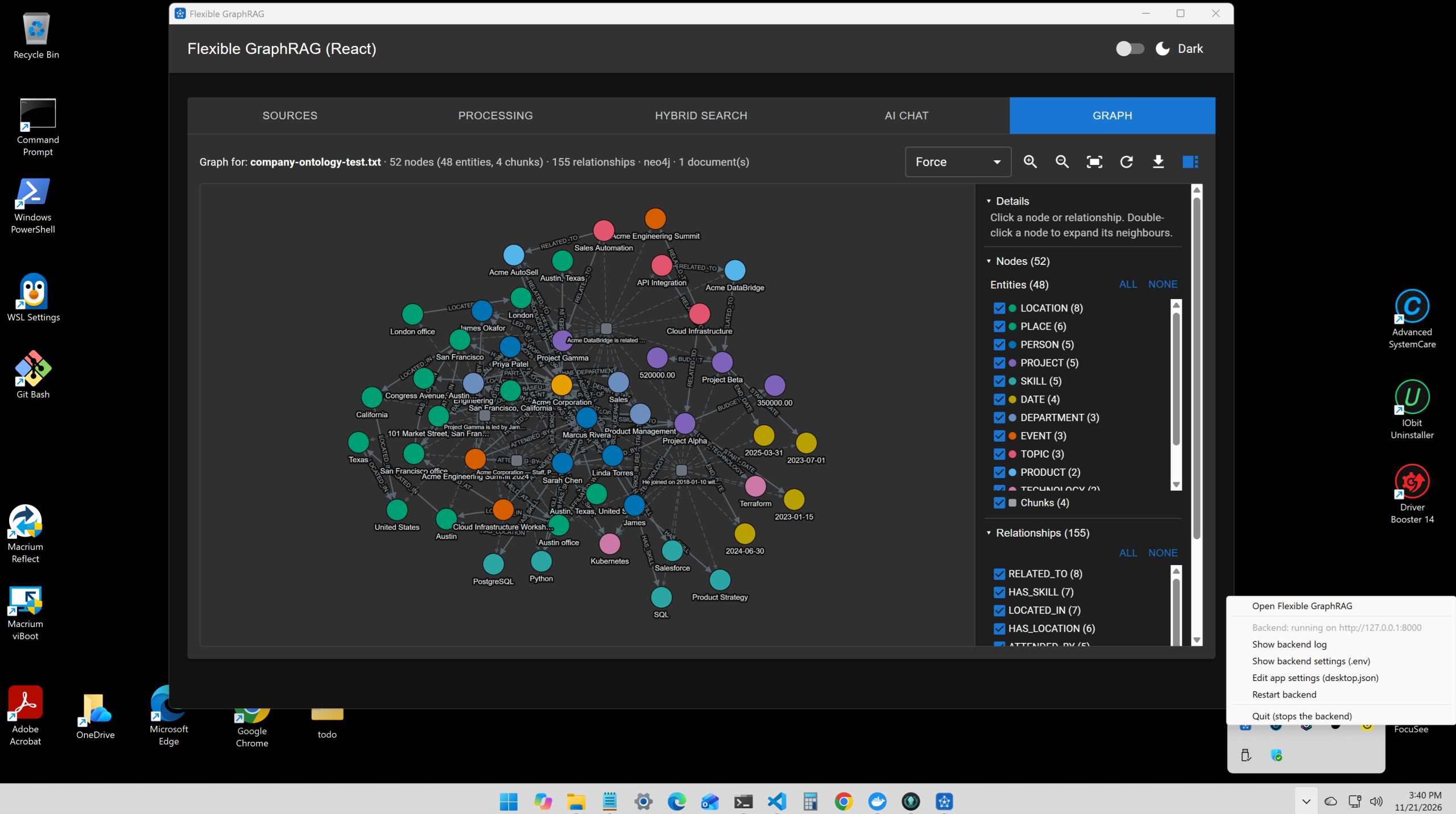
The Flexible GraphRAG Desktop App on Windows: the Graph tab (works with all 15 supported property graph databases) showing the knowledge graph of an ingested document (52 nodes: 48 entities and 4 chunks, 155 relationships, here in Neo4j), and the tray icon / menu with the backend’s state, Show backend log, Show backend settings (.env), Edit app settings (desktop.json), Restart backend and Quit.
Desktop App (early version)
The desktop app is built with Tauri (Rust). It wraps the React, Vue or Angular UI with all 5 Flexible GraphRAG tabs: Sources, Processing, Hybrid Search, AI Chat and Graph.
- Local Files and Folders data source: browse the local disk and ingest files and folders. Auto Sync keeps them up to date.
- Search, AI query / chat and the Graph tab work on local files along with all the other data sources.
- Click a source link in search results and AI query / chat to open it: a local file opens in its app, and a document from most other data sources opens in your default browser: Alfresco (ACA or Share), Nuxeo Web UI, SharePoint, OneDrive, Box, Google Drive, S3, GCS, Azure Blob (when signed in to Azure), web pages, Wikipedia and YouTube (at the segment’s start).
- Tray icon with the backend’s state, its log and
.env, the app’sdesktop.json, and Restart backend. - Backend: the app can run its own (from a checkout or a PyPI install folder, with a per-install API token and CORS limited to the app), use one already running on port 8000, or connect to one set in
desktop.json/FLEXIBLE_GRAPHRAG_URL.
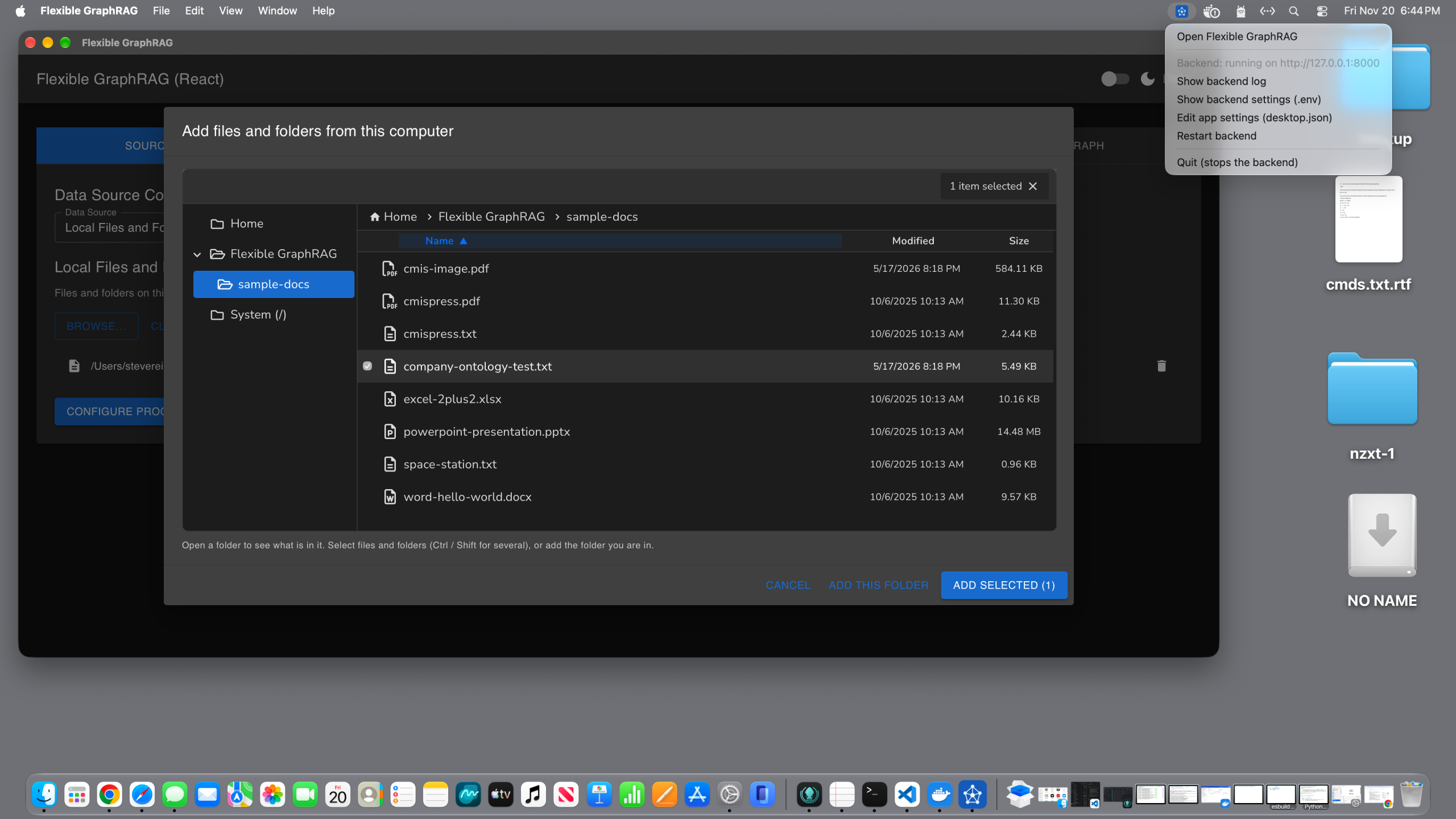
macOS: the Local Files and Folders source’s browser, “Add files and folders from this computer”, with a file picked from the sample-docs folder, and the tray menu at the top right.
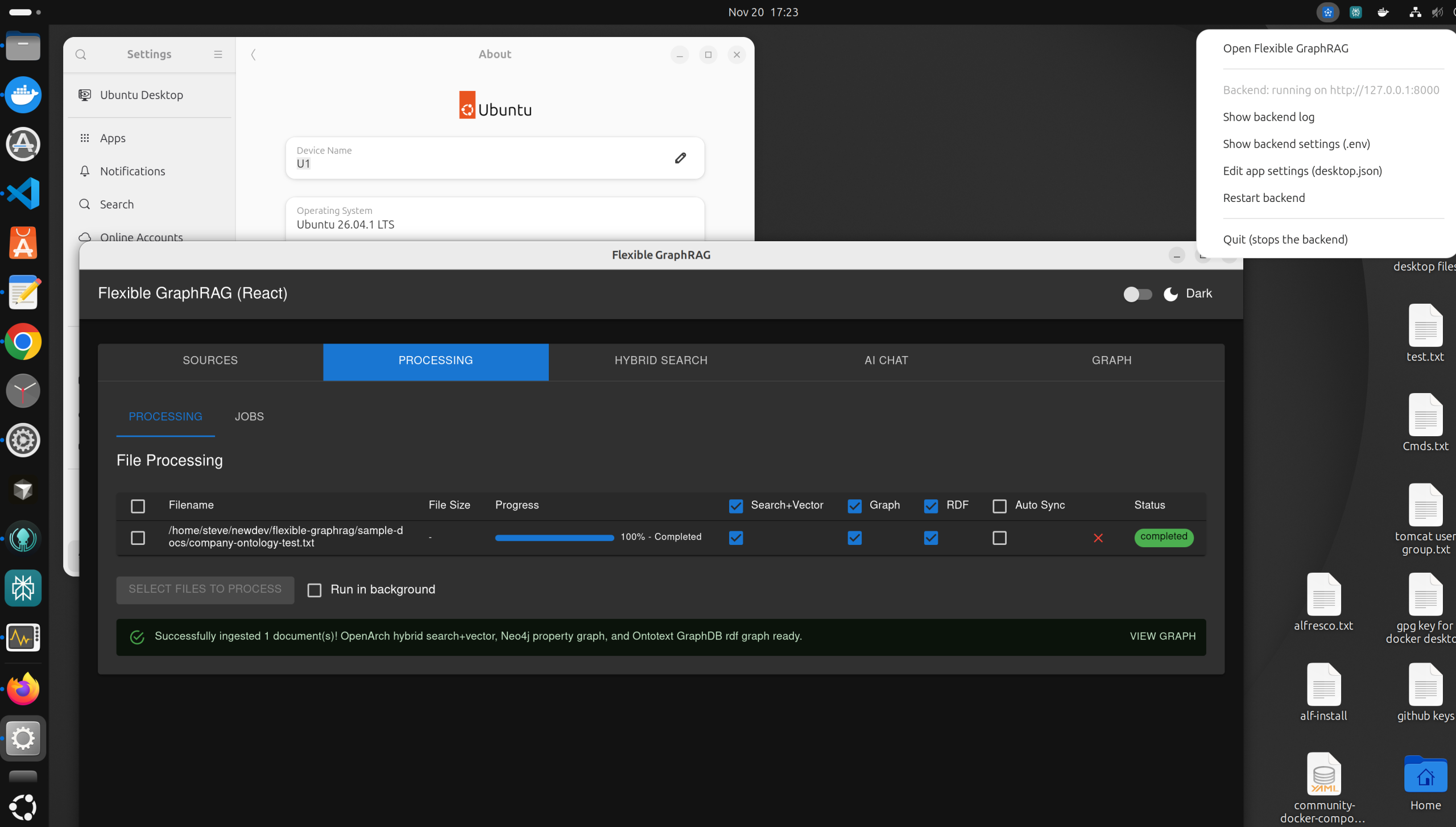
Linux (Ubuntu 26.04): the Processing tab after ingesting a local file into OpenArch hybrid search + vector, a Neo4j property graph and an Ontotext GraphDB RDF graph, with View Graph to open it in the Graph tab.
Browse… in the data source forms
In both the desktop app and the web UIs, Browse… shows a file/folder browser in the Alfresco, Nuxeo, CMIS, SharePoint, OneDrive, Box, S3, Azure Blob, GCS and Google Drive forms, to pick files and folders to ingest. You open folders one level at a time and pick folders and documents; picks show as chips, and each source type remembers its last folder. The same browser is in @flexible-graphrag/angular-ui, and it’s available to other clients through GET / POST /api/browse.
A lighter Docker-free config, or the full Docker config
You can now run without Docker. SQLite can be the auto-sync incremental update state store (INCREMENTAL_STATE_STORE=sqlite, SQLITE_INCREMENTAL_PATH). It uses the same tables as PostgreSQL but doesn’t need a database server. Pair it with embedded stores such as LanceDB (vector), BM25 (search), LadybugDB (property graph), and embedded ArcadeDB (property graph). See the new Docker-Free Setup page in the docs.
Embedded ArcadeDB runs inside the backend process, with no ArcadeDB server to start: install arcadedb-embedded and set ARCADEDB_GRAPH_DB_CONFIG={"mode": "embedded", "db_path": "./arcadedb_data", ...}. It can optionally also start ArcadeDB’s HTTP server ("embedded_server": true, port 2482), so you can look at the graph in ArcadeDB Studio while the app runs. Today this goes through the current llama-index-graph-stores-arcadedb, so it’s for the LlamaIndex graph backend (GRAPH_BACKEND=llamaindex, the default). More work is needed to support the newer native embedded ArcadeDB.
CocoIndex (PIPELINE_BACKEND=cocoindex, the optional incremental pipeline) is part-way there. Open source CocoIndex doesn’t use PostgreSQL: it keeps its change detection (memoization) state in an embedded LMDB file (COCOINDEX_DB=./cocoindex.db). Flexible GraphRAG with CocoIndex still uses PostgreSQL (POSTGRES_INCREMENTAL_URL) for:
- the
datasource_configtable, so sources added from the UI are rebuilt and keep syncing after a backend restart (without PostgreSQL the.envsource still runs, but sources added from the UI don’t survive a restart); - optional per-run and per-stage monitoring tables (
cocoindex_run_log,cocoindex_ingest_log, withCOCOINDEX_ENABLE_PG_MONITORING=true); - pgvector, if you choose it as the vector store.
Changes are planned so Flexible GraphRAG with CocoIndex can use the same SQLite file for its data source registry and monitoring, and with that run in the Docker-free config too.
Or use the full Docker config, which can include any of the supported databases (with both the desktop app and the web UIs). With the Docker config, the incremental update state (data source configs and document state) can be kept in Hyland OpenArch (INCREMENTAL_STATE_STORE=openarch), whose OpenSearch can also be used for search and vectors, or in PostgreSQL (the default).
Federated Flexible GraphRAG Backends
Federation is off by default. When it’s on, search, AI query and AI chat also ask other Flexible GraphRAG backends and fuse their results, e.g. from a personal backend, plus a team one, plus a company one. Set REMOTE_FG_URL (with _NAME, _API_TOKEN, _TIMEOUT) for one, or REMOTE_FG_BACKENDS (a JSON list) for several.
- Only the question and the asker’s sign-ins go out.
- A remote’s results, sources (e.g. “Alfresco · team”) and needed sign-ins carry its name.
- Sources you pick go only to their own backend.
- A failed or slow remote is skipped with a notice.
- Forwarded questions aren’t passed on again, so backends can’t loop.
Also in v0.11.0
- Optional
API_TOKEN: every/apirequest then needsX-API-Token(React / Vue:VITE_API_TOKEN; MCP server:FLEXIBLE_GRAPHRAG_API_TOKEN).CORS_ORIGINSlimits which browser origins can call the API. - Ingest folders API:
GET /api/ingest-allowed-paths, and adding folders at runtime. - Weaviate 1.40+ fix (no vectors were stored and searches failed), and a LangChain SPARQL
PREFIXfix for GraphDB. - Linux fixes: NLTK data permissions, and the first search after an ingest.
- Building Python packages on macOS and Linux, in addition to the Windows tip, in the Python Backend docs page’s new Platform notes section. That’s needed when a dependency has no pre-built wheel for your Python version, e.g. a newly released Python, or
pystemmer:- Windows: Microsoft C++ Build Tools (“Desktop development with C++”).
- Linux: a C compiler and the Python headers for your venv’s version (
build-essential python3.14-devon Debian / Ubuntu,gcc gcc-c++ python3.14-develon Fedora / RHEL), or a uv-managed Python, which includes its own headers. - macOS: the Xcode Command Line Tools (
xcode-select --install), also needed to build the desktop app. With the python.org Python, run Install Certificates too, or HTTPS downloads during a source build (and NLTK data on first run) fail withCERTIFICATE_VERIFY_FAILED.
- Fixes for LanceDB with mixed sources, Google Drive, SharePoint, Box, OneDrive auto sync and CMIS, and Ctrl+C on Windows.
- New docs pages: Desktop App, Docker-Free Setup, Federated Backends, API Token and CORS, and Tab 5 — Graph.
KG Spaces updated for v0.11.0
KG Spaces for Alfresco ACA, KG Spaces for Nuxeo (and its Nuxeo Web UI add-on) and KG Spaces Deployment are all updated for Flexible GraphRAG v0.11.0 and @flexible-graphrag/angular-ui 0.11.0.
About Flexible GraphRAG and KG Spaces
Flexible GraphRAG is an Apache 2.0 open source AI context platform: document processing (Docling, LlamaParse or LiteParse), knowledge graph auto-building, ontologies, GraphRAG and RAG, hybrid search (fulltext, vector, property graph, RDF/SPARQL), AI query and AI chat. It supports 14 data sources (10 with incremental auto-sync), 15 property graphs, 4 RDF stores, 10 vector stores and OpenSearch / Elasticsearch / BM25 search. The backend is Python with both LlamaIndex and LangChain. There are React, Vue and Angular web and desktop UIs (the desktop app runs on Windows, macOS and Linux) and an MCP server. All databases and dashboards can be run with the provided Docker Compose setup, or you can go Docker-free with embedded stores.
KG Spaces brings Flexible GraphRAG into content management apps. KG Spaces for Alfresco ACA is an Apache 2.0 Alfresco Content App extension. KG Spaces for Nuxeo is a Nuxeo Web UI add-on plus an Angular app that shares the Web UI session. Both are built on the shared @flexible-graphrag/angular-ui library and use the user’s own repository permissions. KG Spaces Deployment runs it all with Docker Compose.
Links
- GitHub: https://github.com/stevereiner/flexible-graphrag
- Desktop App: https://github.com/stevereiner/flexible-graphrag/blob/main/flexible-graphrag-ui/desktop/README.md
- KG Spaces for Alfresco ACA: https://github.com/stevereiner/kg-spaces-aca
- KG Spaces for Nuxeo: https://github.com/stevereiner/kg-spaces-nuxeo
- KG Spaces Deployment: https://github.com/stevereiner/kg-spaces-deployment
- Documentation: https://stevereiner.github.io/flexible-graphrag/
- PyPI: https://pypi.org/project/flexible-graphrag/
- Flexible GraphRAG MCP on PyPI: https://pypi.org/project/flexible-graphrag-mcp/
- npm: https://www.npmjs.com/package/@flexible-graphrag/angular-ui, https://www.npmjs.com/package/@flexible-graphrag/graph-view
- Docker Hub: https://hub.docker.com/u/integratedsemantics
Previous release, v0.10.0 (a new Graph tab in Flexible GraphRAG and KG Spaces):
- Blog: https://integratedsemantics.org/2026/11/11/flexible-graphrag-v0-10-0-a-new-graph-tab-in-flexible-graphrag-and-kg-spaces/
- X: https://x.com/stevereiner/status/2120408962063355933
- LinkedIn: https://www.linkedin.com/posts/steve-reiner-abbb5320_graphrag-knowledgegraph-rag-share-7526182442823634944-2tY4/
