Flexible GraphRAG v0.10.0: a new Graph tab in Flexible GraphRAG and KG Spaces

Flexible GraphRAG v0.10.0 was released on November 10, 2026. The main addition is a Graph tab that shows the knowledge graph behind your documents: the entities and relationships extracted from them. It’s in the Flexible GraphRAG React, Vue and Angular apps and in KG Spaces for Alfresco and Nuxeo.
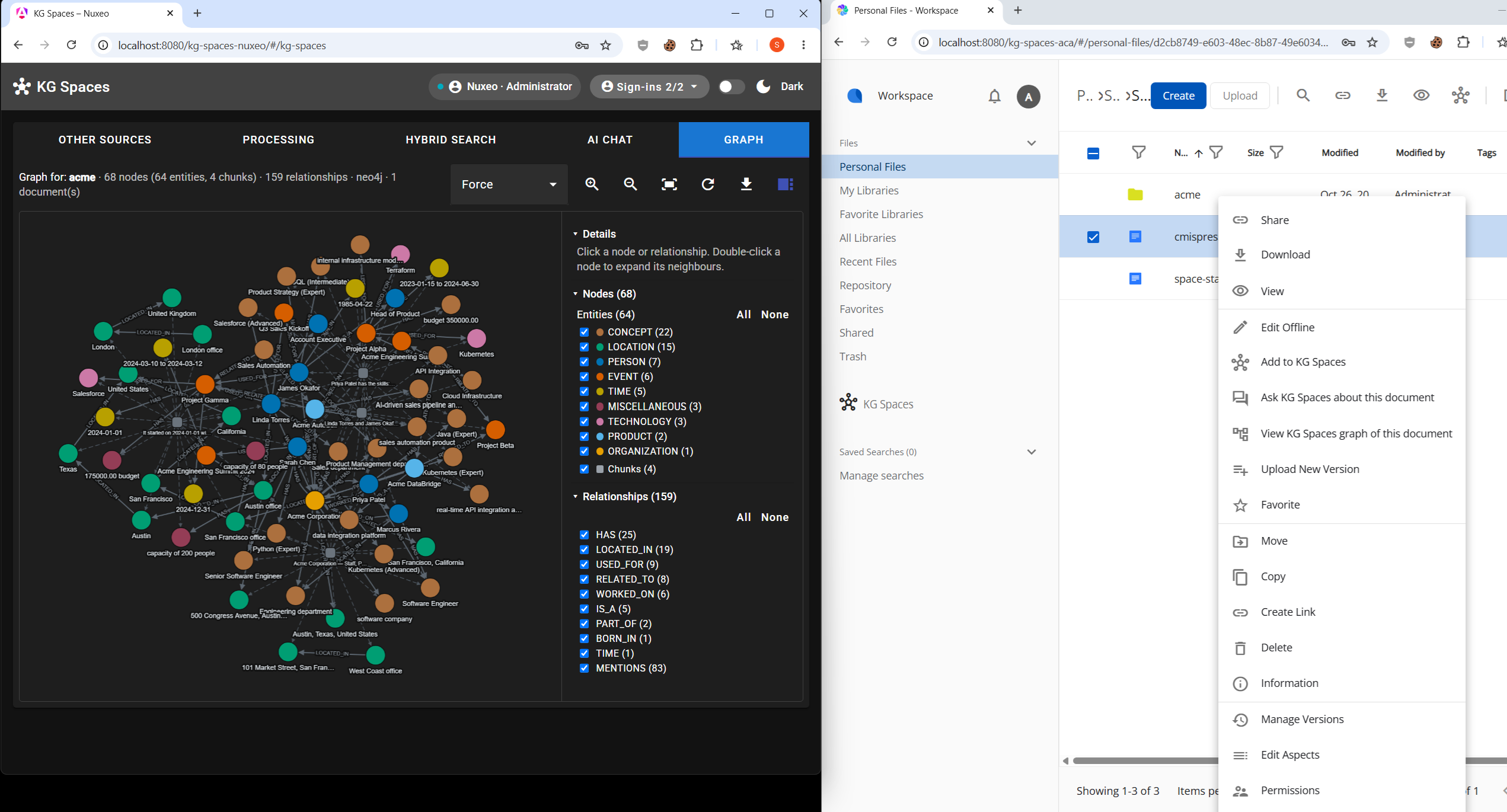
Left: KG Spaces for Nuxeo, Graph tab for the “acme” folder (68 nodes, 159 relationships, in Neo4j). Right: KG Spaces for Alfresco ACA with a document selected and its context menu: Add to KG Spaces, Ask KG Spaces about this document, and View KG Spaces graph of this document.

The Graph tab

The Graph tab shows the entities and relationships extracted from:

  • an ingest: Show graph on Processing tab jobs and rows
  • Hybrid Search results
  • AI Query sources and AI Chat sources
  • a selected document or folder in KG Spaces

Each entity type gets its own colour. The side panel lists entity types and relationship types with counts, and you can switch each one on or off. Chunk nodes are optional. Click a node or relationship to see its details, double-click a node to expand its neighbours, and export the graph. Only documents the user may read are shown.

The graph comes from ingest: a document has one once it has been ingested with Graph checked. A document that hasn’t been ingested yet, or was ingested for search and vector only (Graph unchecked), has no graph to show. Whether RDF was checked doesn’t matter.

Where it is

  • The Flexible GraphRAG apps: React, Vue and Angular
  • KG Spaces for Alfresco ACA (Angular): select a document or folder and choose View KG Spaces graph of this document from the context menu. The three KG Spaces actions (Add to KG Spaces, Ask KG Spaces about this document, View KG Spaces graph) are also on the graph icon in the ACA toolbar.
  • KG Spaces for Nuxeo (Angular), which works with Nuxeo Web UI. The Nuxeo Web UI customization has the same three actions on its KG Spaces toolbar button:
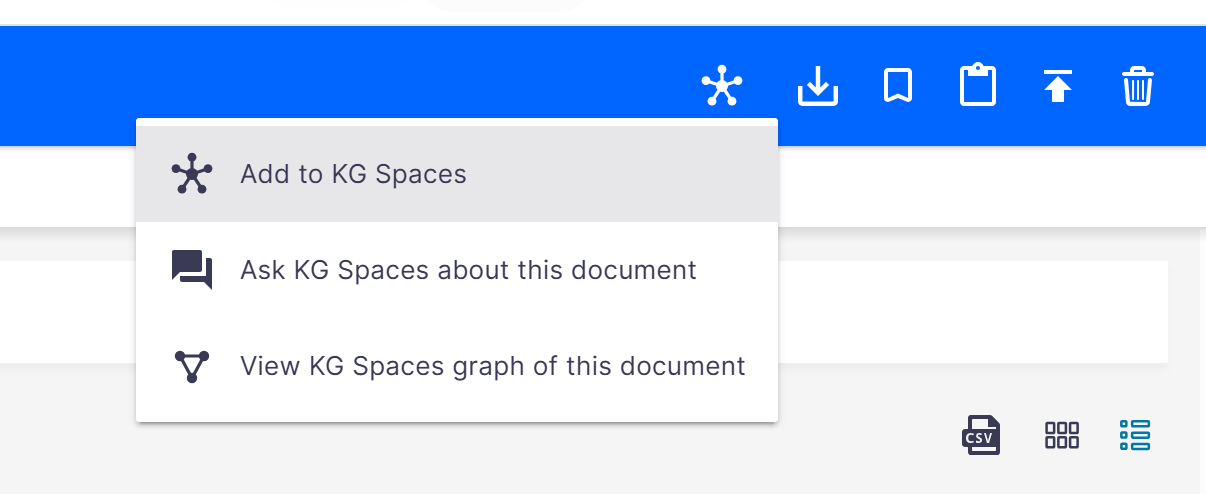
The KG Spaces toolbar button in Nuxeo Web UI: Add to KG Spaces, Ask KG Spaces about this document, and View KG Spaces graph of this document.

The graph view is a shared Cytoscape.js component, published on npm as @flexible-graphrag/graph-view.

All 15 property graphs

The Graph tab works with all 15 property graph databases Flexible GraphRAG supports:

Neo4j, ArcadeDB, FalkorDB, LadybugDB, Memgraph, NebulaGraph, Amazon Neptune, Neptune Analytics, Google Cloud Spanner, ArangoDB, Apache AGE, Cosmos Gremlin, HugeGraph, SurrealDB and TigerGraph.

It reads the property graph; RDF stores aren’t shown in the Graph tab.

Also in v0.10.0

  • Google Cloud Spanner Graph with LangChain (GRAPH_BACKEND=langchain), where it was LlamaIndex only before.
  • Ollama models stay on the GPU. LlamaIndex was sending each model’s maximum context with every request (up to 128k), which made Ollama reserve far more memory than needed and spill models onto the CPU, so calls took minutes. The new OLLAMA_CONTEXT_WINDOW setting (default 8192) is now sent by both the LlamaIndex and LangChain Ollama clients. After the first query, ollama ps should show the model at 100% GPU. See Ollama configuration.
  • Better search results: weak matches are dropped and scores rescaled (SEARCH_MIN_RELATIVE_SCORE, VECTOR_MIN_RELATIVE_SIMILARITY), plus a SEARCH_ANALYZER setting for Elasticsearch / OpenSearch.
  • Graph fixes: a document’s graph now includes relationships shared with other documents, and deleting or re-syncing a document keeps the entities and relationships other documents still use, in both property graphs and RDF stores.

v0.9.1 (November 3, 2026)

  • OpenArch in the Flexible GraphRAG Docker Compose stack (docker/includes/openarch.yaml), not just in the KG Spaces deployment.
  • Faster KG extraction by raising KG_EXTRACTION_WORKERS: the default of 4 suits local LLMs like Ollama; use 8-16 with cloud LLMs like OpenAI.
  • Security fixes (see SECURITY.md): REST and MCP filesystem ingest only reads paths under uploads/, SOURCE_PATHS or the new INGEST_ALLOWED_PATHS; query injection fixed in the Memgraph, Apache AGE, ArcadeDB, Ladybug, Gremlin / Cosmos DB and NebulaGraph adapters and the RDF converter; and graph Q&A now runs only read queries, so a question can’t get the LLM to change or delete graph data.
  • Preparatory work for Python 3.15 and free-threaded 3.15t.

About Flexible GraphRAG and KG Spaces

Flexible GraphRAG is an Apache 2.0 open source AI context platform: document processing (Docling, LlamaParse or LiteParse), knowledge graph auto-building, ontologies, GraphRAG and RAG, hybrid search (fulltext, vector, property graph, RDF/SPARQL), AI query and AI chat. It supports 14 data sources (10 with incremental auto-sync), 15 property graphs, 4 RDF stores, 10 vector stores and OpenSearch / Elasticsearch / BM25 search. The backend is Python with both LlamaIndex and LangChain; the frontends are React, Vue and Angular, and there’s an MCP server. All databases and dashboards can be run with the provided Docker Compose setup.

KG Spaces brings Flexible GraphRAG into content management apps: KG Spaces for Alfresco ACA is an Apache 2.0 Alfresco Content App extension, and KG Spaces for Nuxeo is a Nuxeo Web UI add-on plus an Angular app sharing the Web UI session. Both are built on the shared @flexible-graphrag/angular-ui library and work with the user’s own repository permissions.

Links

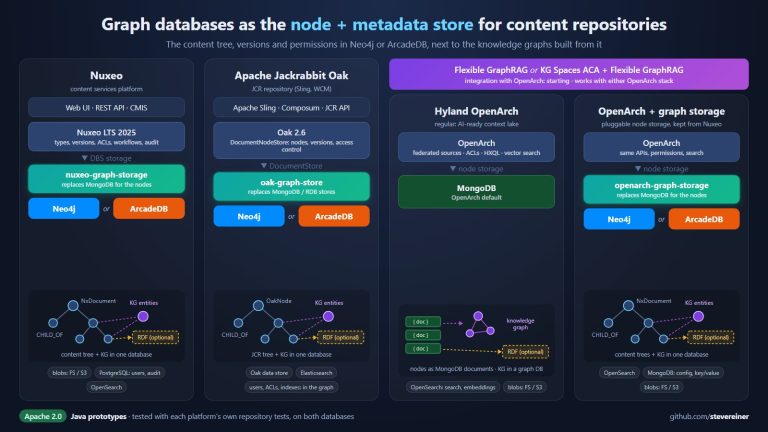
Graph databases as the node store for content repositories: three new open source projects

Flexible GraphRAG on GitHub

X.com Steve Reiner @stevereiner  LinkedIn Steve Reiner LinkedIn Posts

Repost of my LinkedIn post from October 16, 2026 (original LinkedIn post)

Graph databases as the node store for content repositories: three new open source projects:
Now available: three Apache 2.0 Java projects that keep a content repositories’ whole tree (documents, folders, metadata, versions, permissions) in Neo4j or ArcadeDB instead of MongoDB or SQL. The platform and its APIs are unchanged, and every write still goes through the repository.

🔹 nuxeo-graph-storage: Nuxeo LTS 2025 with its document and folder nodes in Neo4j or ArcadeDB. Both run Nuxeo‘s own core repository tests, and the Nuxeo Web UI works with either. https://github.com/stevereiner/nuxeo-graph-storage

🔹 oak-graph-store: Apache Jackrabbit Oak DocumentStores for Neo4j and ArcadeDB, replacing the MongoDB and RDB stores. Apache Sling and Composum Tools run with the whole repository in the graph.
oak-graph-store: https://github.com/stevereiner/oak-graph-store

🔹 openarch-graph-storage: Hyland OpenArch federates AI-ready data from sources across the organization and makes it available to AI services and agents while respecting permissions. OpenArch kept Nuxeo‘s pluggable node storage, so this stores its nodes in Neo4j or ArcadeDB.
openarch-graph-storage: https://github.com/stevereiner/openarch-graph-storage
Hyland OpenArch: https://github.com/Hyland/OpenArch

Why a graph?
• Better modeling: business entities (products, contracts, suppliers) and their relations as typed nodes and edges, not only files.
• Impact and dependency questions, many hops deep, become direct traversals.
• Context graph support: the content tree and the knowledge graphs built from it in one database, entities linked to their source documents.
• AI agents get context and provenance from the graph; the repository still enforces what they may see and do.

What's next
Starting: Flexible GraphRAG and KG Spaces ACA with OpenArch, regular or with openarch-graph-storage. Either way, Flexible GraphRAG can build the knowledge graph in a property graph database (any of 15), an RDF store (any of 4), or both; with graph storage, most likely the same Neo4j or ArcadeDB as the content, plus optional RDF. Flexible GraphRAG‘s Turtle Ontologies work with both property graphs and RDF stores.
Flexible GraphRAG: https://github.com/stevereiner/flexible-graphrag
KG Spaces ACA: https://github.com/stevereiner/kg-spaces-aca

All three node storage projects are prototypes. Feedback welcome.

Flexible GraphRAG or RAG is flexing to the max: 8 Graph databases, 10 Vector databases, 3 search engines working (can docker compose all including dashboards), 13 data sources

Flexible GraphRAG on GitHub

X.com Steve Reiner @stevereiner  LinkedIn Steve Reiner LinkedIn Posts

Flexible GraphRAG or Flexible RAG, an Apache 2.0 open source python platform, is now flexing to the max using LlamaIndex, in terms of supporting more databases and data sources: supports 8 graph databases, 10 vector databases, 3 search engines, and 13 data sources,. Also supports knowledge graph auto-building, schemas, LlamaIndex LLMs, Docling doc processing (LlamaParse coming soon), GraphRAG mode, RAG only mode, Hybrid search, and AI query / chat. Has React, Vue, and Angular frontends, and a FastAPI backend. React, Vue, Angular, Backend now work on Windows, Mac, Linux (standalone or in docker). Also has a FastMCP MCP server. Has a convenient docker compose that can include any of the databases (Vector, Graph, Search, Alfresco) and Dashboards / Consoles.

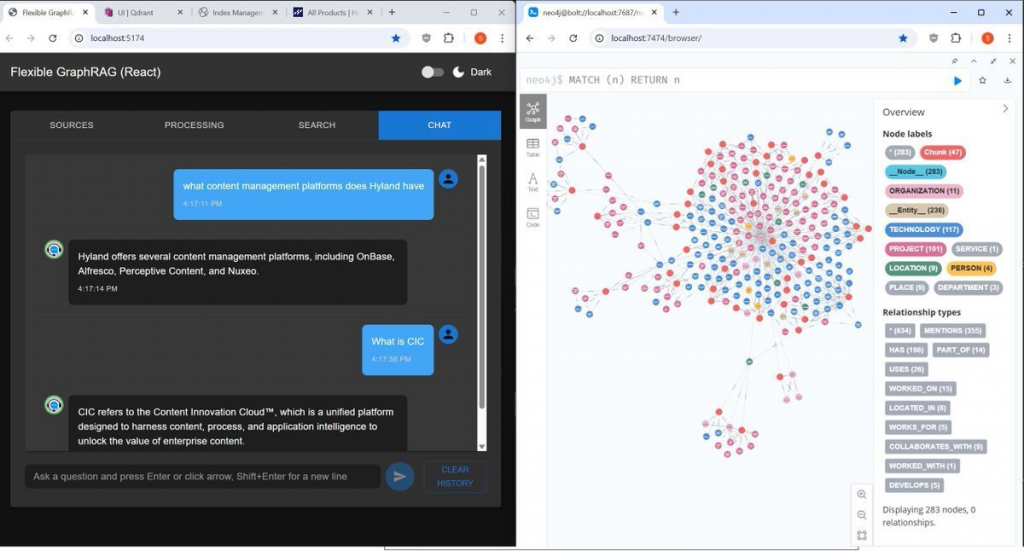
(Flexible GraphRAG AI chat shown with Hyland products web page(s) used with web pages data source to auto-generated a Neo4j graph).

Convenient docker compose: you can choose to include from all supported 10 vector and 8 graph databases, Elasticsearch, OpenSearch, and Hyland Alfresco Community. Include in the docker-compose.yaml by just removing the # comment in front of their includes. Dashboards / Consoles for these databases, as much as possible are also included in the docker compose choices (either in the yaml file for the database or for some a separate yaml file include).

You can run the docker with the databases with the backend and frontends (React, Angular, Vue) running stand alone in separate terminal windows. In addition to running the databases in docker, you can include the backend and frontends in the dock compose by including the app-stack.yaml and proxy.yaml includes. Now have no config duplication for standalone backend+frontends vs full docker mode: previously had to repeat all config in app-stack.yaml now use env_file: include standalone backend .env and overrides with include of docker.env (for configs that need host.docker.internal)

All 8 Graph database working: Neo4j, ArcadeDB, FalkorDB, archived Kuzu (LadybugDB fork todo), NebulaGraph, Memgraph, Amazon Neptune, Amazon Neptune Analytics

All 10 Vector databases working: Qdrant, Elasticsearch vector, OpenSearch vector, Neo4j vector, Milvus, Weaviate, Chroma (both http, embedded), Pinecone, PostgreSQL + pgvector, LanceDB

All 3 Search engines working: Elasticsearch, OpenSearch, LlamaIndex built-in BM25

New Data Sources: using LlamaIndex readers: 1. working ones that don’t use document processing: Web Pages, Wikipedia, Youtube, 2. working using document processing: S3, 3. ones using document processing still to test: Google Drive, Microsoft OneDrive, Azure Blob, GCS, Box, SharePoint.

Support for Docling document processing is currently available. Being able configure to use LlamaParse coming soon.

Original data sources with document processing that don’t use LlamaIndex readers: filesystem, Alfresco, CMIS. Hyland Alfresco Community can be included in the docker compose by taking the “#” comment off the beginning of its include.

LLMs: LlamaIndex LLMs (LlamaIndex has support for very many), Flexible GraphRAG currently has config for 1. tested, working: OpenAI, Ollama, 2. untested: Anthropic Claude, Google Gemini, Azure OpenAI.

Previous Flexible GraphRAG posts:

See Flexible GraphRAG Initial Version Blog Post

See New Tabbed UI for Flexible GraphRAG (and Flexible RAG)

See Flexible GraphRAG: Performance improvements, FalkorDB graph database support added

See Flexible GraphRAG: Supports ArcadeDB Graph Database with new LlamaIndex Integration

See Flexible GraphRAG: Amazon Neptune, Neptune Analytics, and Graph Explorer support added

Flexible-GraphRAG: Performance improvements, FalkorDB graph database support added

See Flexible GraphRAG Initial Version Blog Post

See New Tabbed UI for Flexible GraphRAG (and Flexible RAG)

Flexible GraphRAG on GitHub

X.com Steve Reiner @stevereiner LinkedIn Steve Reiner LinkedIn

  1. Improved the performance of flexible-graphrag
    • Added doing parallel Docling document conversion helped pipeline timing
    • Now not doing KeywordExtractor/SummaryExtractor also helped pipeline timing
    • Ollama Parallel Processing (need OLLAMA_NUM_PARALLEL=4)
    • Async PropertyGraphIndex with use_async=True
    • Increased kg_batch_size from 10 to 20 chunk
    • Logging added for performance timing
  2. Added performance testing results to readme.md (6 docs with openai with each graph database (neo4j, kuzu, falkordb)
  3. Added docs/performance.md: has performance testing results for each graph database with 2,4,6 docs with openai and 2,4 docs with ollama
  4. Added support for FalkorDB graph database https://www.falkordb.com/ and https://github.com/FalkorDB/falkordb The abstractions of LlamaIndex, LlamaIndex support for FalkorDB, and the configurability of flexible-graphrag made this a relatively straightforward process.
  5. Added LlamaIndex DynamicLLMPathExtractor support (works on openai, not on ollama currently)
  6. Added config of kg extractor type (simple, schema, or dynamic) to set which LlamaIndex extractor to use (SimpleLLMPathExtractor, SchemaLLMPathExtractor, or DynamicLLMPathExtractor)
  7. Added config of MAX_TRIPLETS_PER_CHUNK and MAX_PATHS_PER_CHUNK
  8. Added readme.md info on system environment setup of ollama for performance and parallelism (OLLAMA_CONTEXT_LENGTH, OLLAMA_NUM_PARALLEL, etc.)
  9. Added new default schema with 35+ relationship combinations, more relations, and entity types: PERSON, ORGANIZATION, TECHNOLOGY, PROJECT, LOCATION
  10. Fixed file upload dialog performance in all 3 front ends: React, Angular, and Vue (chosen files display quickly after dialog ok)

New Tabbed UI for Flexible GraphRAG (and Flexible RAG)

See Flexible GraphRAG Initial Version Blog Post

Flexible GraphRAG on GitHub

X.com Steve Reiner @stevereiner LinkedIn Steve Reiner LinkedIn

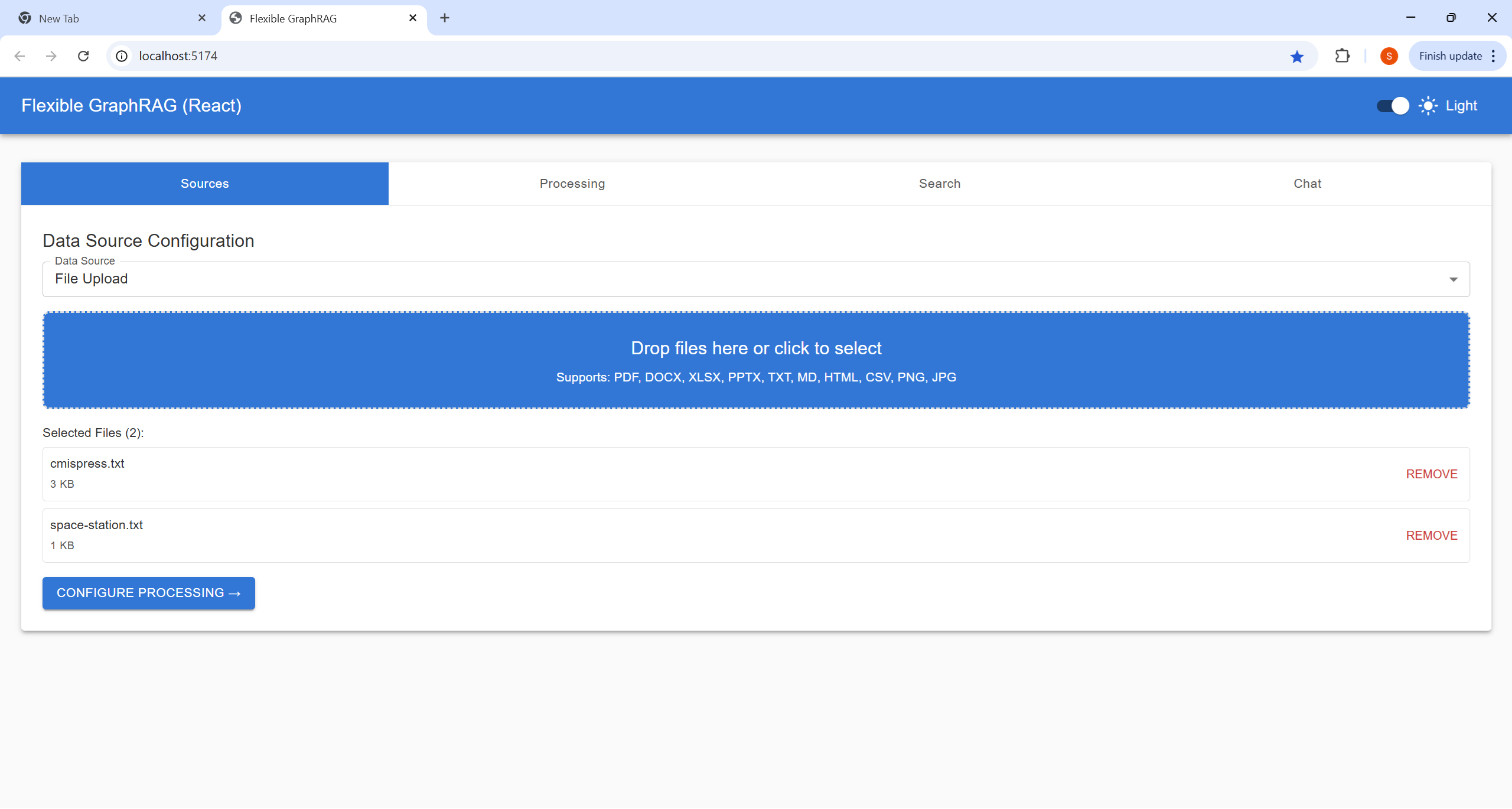
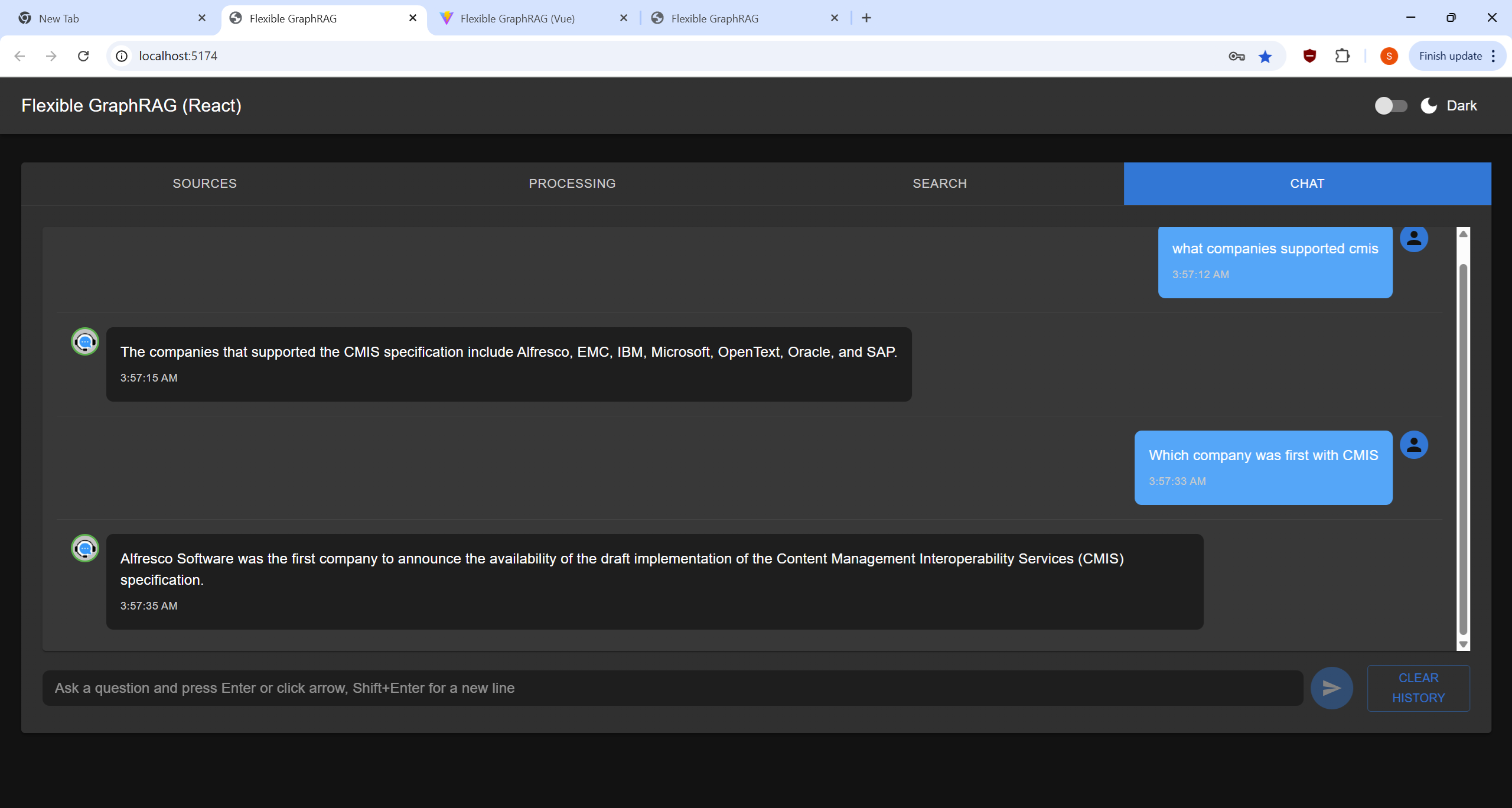
The Angular, React, and Vue frontend clients now have different stages organized into different tabs so they have room. They all can be switched between a dark and light theme using the slider at the top right corner. New functionality beyond the old UI includes a file upload dialog, drag/drop upload, a table with file processing progress bars, and a new Chat UI. Note the github readme.md page has collapse / expand sections to look at screenshots with dark and light themes for React, and only shows the light theme for Angular and Vue.

Sources Tab


Allows you to choose file to upload from the file system, or paths file or folder path in Alfresco or CMIS repositories. For filesystem files you can now use a file upload dialog and drag/drop files onto the drop area in the source tab view.

For Alfresco and CMIS their no file picker UI currently (only a field for folder or file path) Note the file path is a basic CMIS style path like /Shared/GraphRAG/cmispress.txt. You also specify username, password and base URL like prefilled http://localhost:8080/alfresco for Alfresco and http://localhost:8080/alfresco/api/-default-/public/cmis/versions/1.1/atom for CMIS.

You then click on “Configure Processing“


Processing Tab

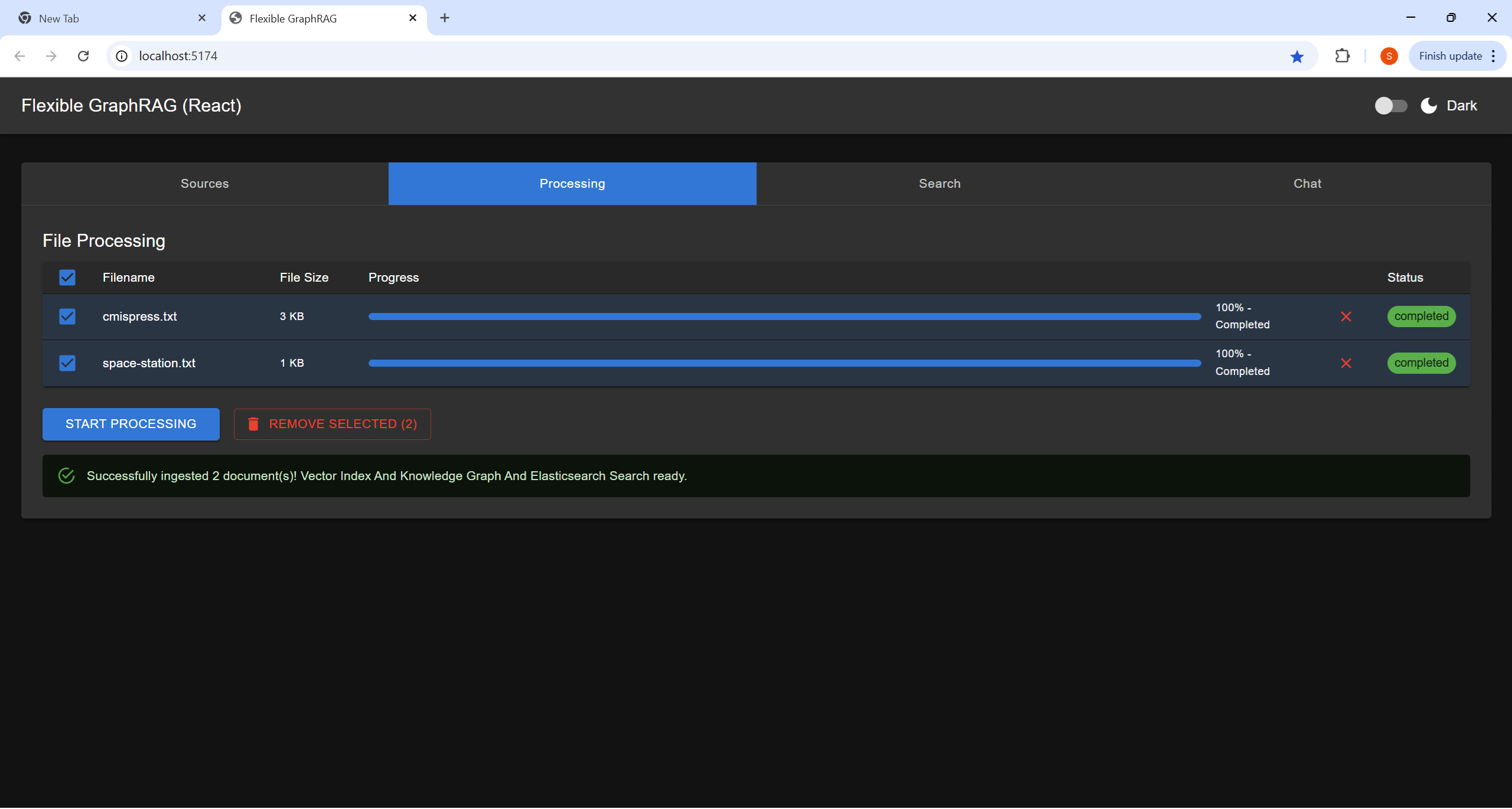
Here you can modify what files get processed by unselecting / selecting file checkboxes, Remove from processing list by using x a on file row, our use the remove selected button.
The click on Start Processing to process selected files.
There is an overall progress bar, and per file progress bars. Note currently all files are processed as one batch in the backend, so the file progress bars will be showing the same status.
You can cancel processing by using the cancel button

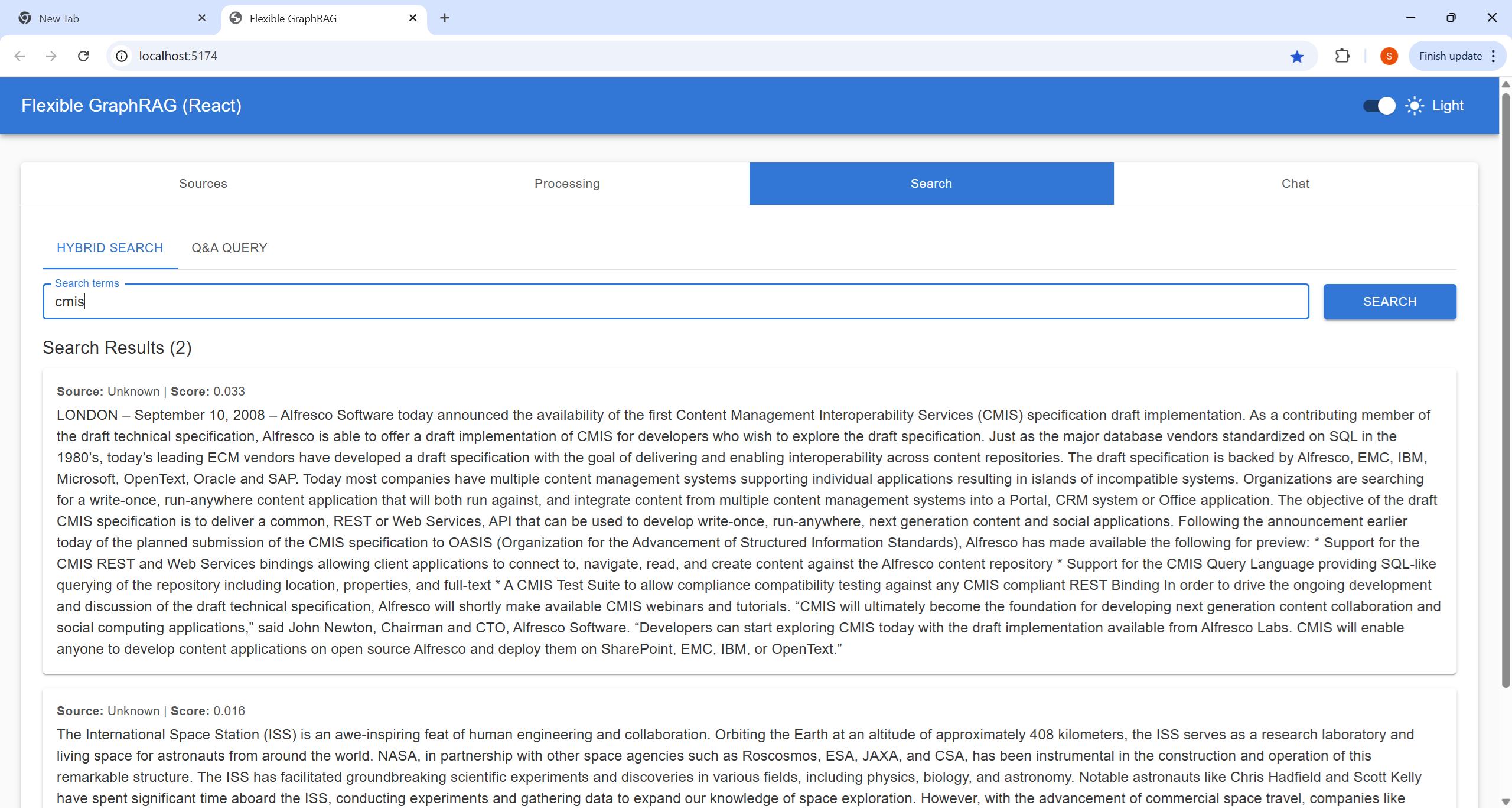
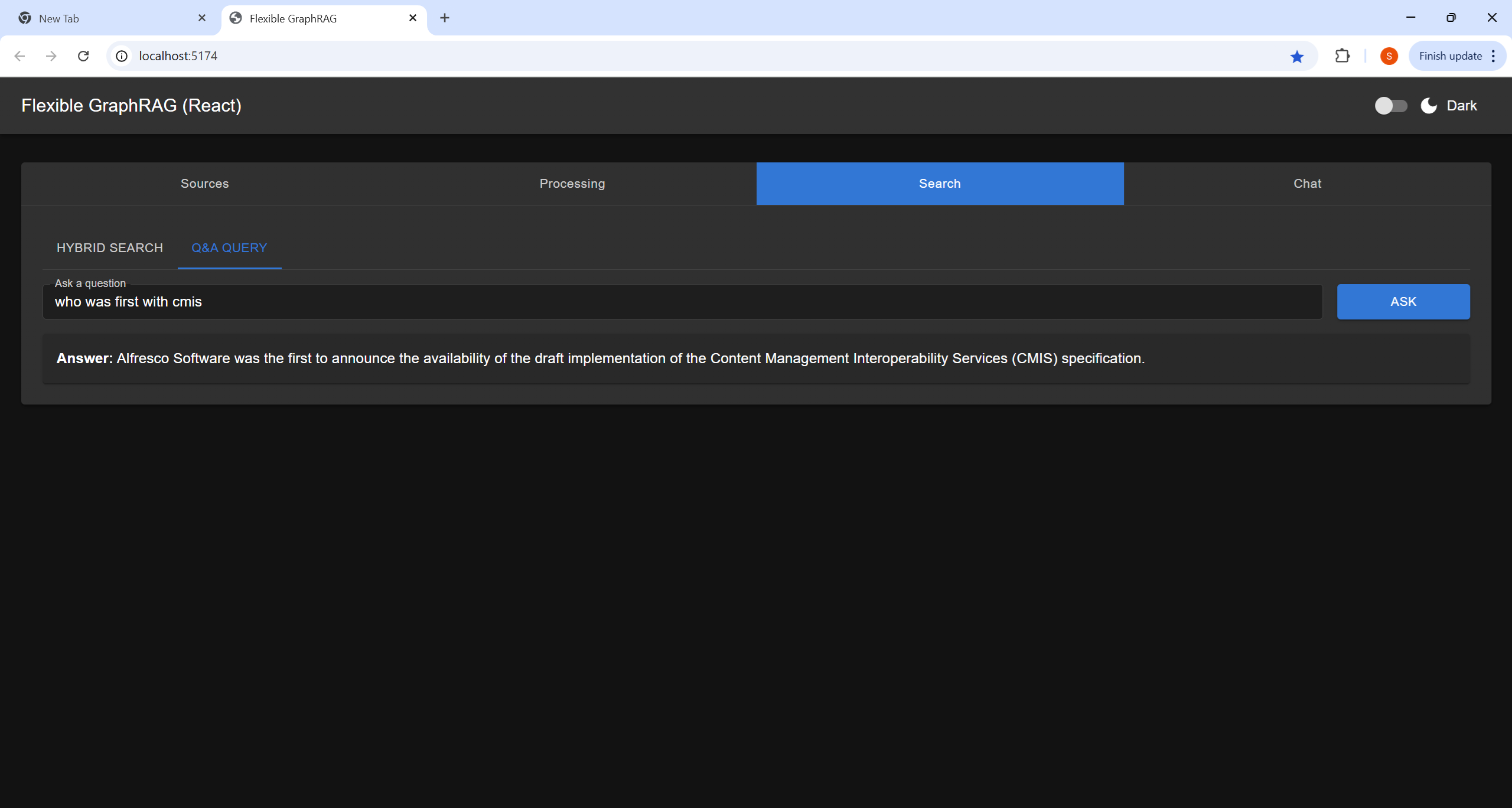
Search Tab

Here you can do a Hybrid Search (Fulltext+Vector RAG+GraphRAG) or (Fulltext+Vector RAG) depending on configuration. This gives you a traditional results list. For now ignore the scores and extra results just check results order.

The Q&A Query, Here you ask a question using conversational style (This is an AI query using the configured LLM and the information submitted in the processing tab (and in full text, vector, and graph “memory”)

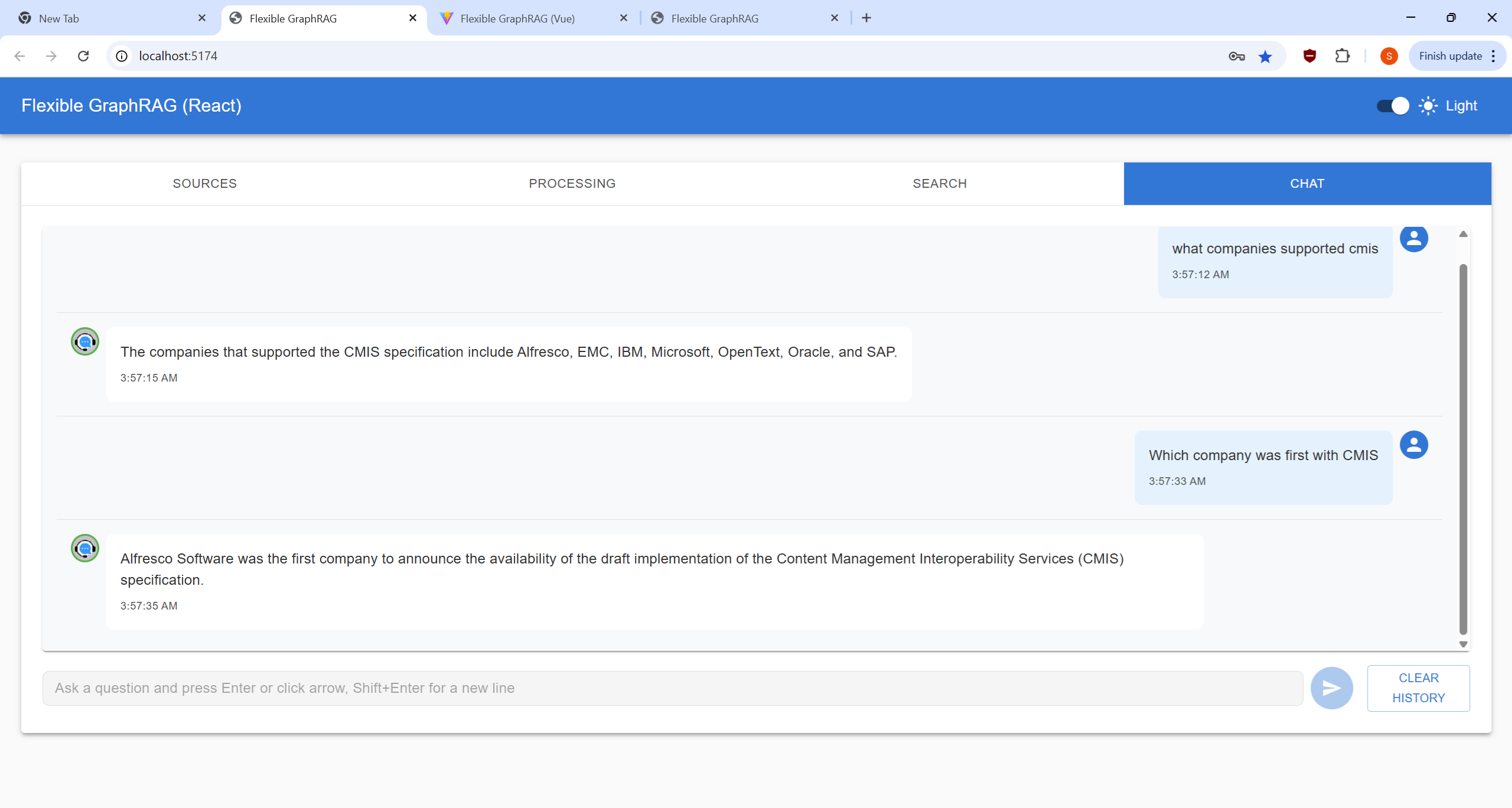
Chat Tab

This a traditional chat style UI allowing you the enter multiple conversational Q&A queries (AI queries like the one at a time in the Search Tab). You hit enter or click the arrow button to submit a query. You can also use Shift+Enter to get a extra new line for your question. The chat view area displays a history of questions and answers. The you can clear things with the Clear History button

Flexible RAG

I used Flexible RAG in the title to indicate that Flexible GraphRAG can be configured to just be a RAG system. This would still have the flexibility that LlamaIndex abstractions provide to be able to plug in different search engines/databases, vector databases, and LLMs. You still get Angular, React, and Vue frontends, have MCP server support, a FastAPI backend, and Docker support. You could just configure a search engine. You could just configure a Graph database for auto graph building of knowledge graphs using the configurable schema support.

For RAG configuration:
Flexible GraphRAG can be setup to do RAG only without the GraphRAG (see env-sample.txt and setup your environment in .env, etc.):

  • Have SEARCH_DB and SEARCH_DB_CONFIG set for elasticsearch, opensearch, or bm25
  • Have VECTOR_DB and VECTOR_DB_CONFIG setup for neo4j, qdrant, elasticsearch, or opensearch
  • Have GRAPH_DB set to none and ENABLE_KNOWLEDGE_GRAPH=false.

Server Monitoring and Management UI

Basically you can use the docker setup and get a docker compose that run all the following at the same time (or a subset by commenting out a compose include) without having to these up individually: Alfresco docker compose (which has Share and ACA), Neo4j docker (which has a console URL), Kuzu API server (not used, used embedded), Kuzu explorer, Qdrant (which has a dashboard), Elasticsearch, Elasticsearch Kibana dashboard, OpenSearch which has a OpenSearch Dashboards URL.

So you can setup a browser window with tabs for all these dashboards, Alfresco Share / ACA, and Neo4J console. This is your monitoring and management UI.

You can uses the Neo4j, Elasticsearch Kibana, Qdrant dashboard, OpenSearch dashboards to delete full text indexes (Elasticsearch, OpenSearch), delete vector indexes (Qdrant, Neo4j, Elasticsearch, OpenSearch) and delete nodes and relationships (Neo4j and Kuzu consoles).